Search Function
The search tools are displayed in the navigation area of the page.

There are two groups of filters that affect how files are found:
- Global Filters at the top of the page
- Search filters in the search area
The global filters can be expanded or collapsed and include:
- Show
- Releases + My WIPs
- Releases
- My WIPs
- Uploaded by
- Manufacturers + Users
- Manufacturers only
- Users only
- Tested in Visualiser
- Tested in Real Life
The global filters can be reset with the reset icon.
The search bar contains a text field with the placeholder Type your search here… and a Search button.
The search is performed in the areas selected in the search filters below the input field. Each checkbox corresponds to an area and the search finds matching text in the enabled areas.

The search text is displayed in the input field. The search is not case-sensitive. Single words are searched in each enabled area. To search for an exact phrase, enter it in double quotation marks.
For example, if you search for profile 700, results are also found with the name 700 Profile.
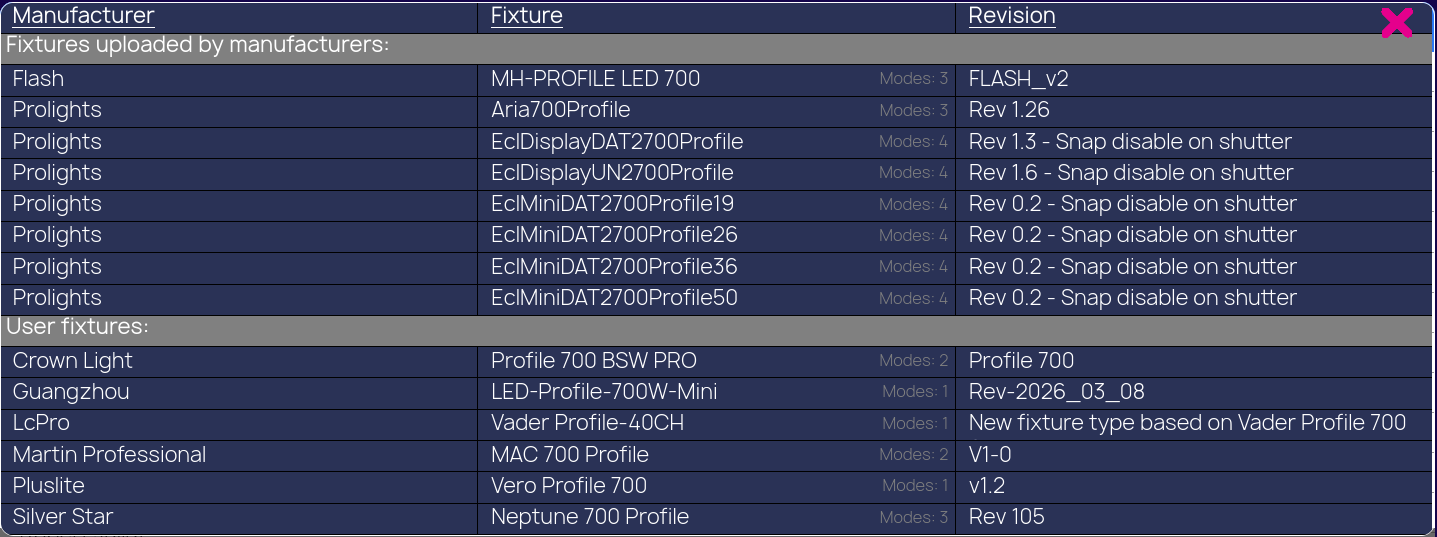
If the words are entered in double quotation marks, for example “profile 700”, the result only lists fixtures where the word order matches exactly.

The search filters can be expanded or collapsed and include:
- Manufacturer
- Fixture
- Revision
- User
The search filters can also be reset with the reset icon.
To perform a search, enter the text and click the Search button.
The result is shown directly below the search bar. It always displays the Manufacturer, Fixture, Modes, and Revision. Clicking one of the results opens the fixture page for the selected file.
Below the search area, the page also shows helpful links to the GDTF Builder and the forum, followed by a Newest Uploads list.