Annex
Annex A. (normative) Attribute Definitions
To describe the fixture types attributes are used. Attributes define the function. (n) and (m) are wildcards for the enumeration of attributes like Gobo(n) - Gobo1 and Gobo2 or VideoEffect(n)Parameter(m) - VideoEffect1Parameter1 and VideoEffect1Parameter2. Fixture Type Attributes without wildcards (n) or (m) are not enumerated. The enumeration starts with 1. The currently defined Fixture Type Attributes are specified in table A1.
Note 1: The predefined Fixture Type Attributes are the preferred to use Fixture Type Attribute. At any time user defined attributes can be introduced as well.
Table A1. Structure of Attribute and Subattribute
| Description | Attribute |
|---|---|
| Dimmer | Controls the intensity of a fixture. |
| Pan | Controls the fixture’s sideward movement (horizontal axis). |
| Tilt | Controls the fixture’s upward and the downward movement (vertical axis). |
| PanRotate | Controls the speed of the fixture’s continuous pan movement (horizontal axis). |
| TiltRotate | Controls the speed of the fixture’s continuous tilt movement (vertical axis). |
| PositionEffect | Selects the predefined position effects that are built into the fixture. |
| PositionEffectRate | Controls the speed of the predefined position effects that are built into the fixture. |
| PositionEffectFade | Snaps or smooth fades with timing in running predefined position effects. |
| XYZ_X | Defines a fixture’s x-coordinate within an XYZ coordinate system. |
| XYZ_Y | Defines a fixture’s y-coordinate within an XYZ coordinate system. |
| XYZ_Z | Defines a fixture‘s z-coordinate within an XYZ coordinate system. |
| Rot_X | Defines rotation around X axis. |
| Rot_Y | Defines rotation around Y axis. |
| Rot_Z | Defines rotation around Z axis. |
| Scale_X | Scaling on X axis. |
| Scale_Y | Scaling on Y axis. |
| Scale_Z | Scaling on Y axis. |
| Scale_XYZ | Unified scaling on all axis. |
| Gobo(n) | The fixture’s gobo wheel (n). This is the main attribute of gobo wheel’s (n) wheel control. Selects gobos in gobo wheel (n). A different channel function sets the angle of the indexed position in the selected gobo or the angular speed of its continuous rotation. |
| Gobo(n)SelectSpin | Selects gobos whose rotation is continuous in gobo wheel (n) and controls the angular speed of the gobo’s spin within the same channel function. |
| Gobo(n)SelectShake | Selects gobos which shake in gobo wheel (n) and controls the frequency of the gobo’s shake within the same channel function. |
| Gobo(n)SelectEffects | Selects gobos which run effects in gobo wheel (n). |
| Gobo(n)WheelIndex | Controls angle of indexed rotation of gobo wheel (n). |
| Gobo(n)WheelSpin | Controls the speed and direction of continuous rotation of gobo wheel (n). |
| Gobo(n)WheelShake | Controls frequency of the shake of gobo wheel (n). |
| Gobo(n)WheelRandom | Controls speed of gobo wheel´s (n) random gobo slot selection. |
| Gobo(n)WheelAudio | Controls audio-controlled functionality of gobo wheel (n). |
| Gobo(n)Pos | Controls angle of indexed rotation of gobos in gobo wheel (n). This is the main attribute of gobo wheel’s (n) wheel slot control. |
| Gobo(n)PosRotate | Controls the speed and direction of continuous rotation of gobos in gobo wheel (n). |
| Gobo(n)PosShake | Controls frequency of the shake of gobos in gobo wheel (n). |
| AnimationWheel(n) | This is the main attribute of the animation wheel’s (n) wheel control. Selects slots in the animation wheel. A different channel function sets the angle of the indexed position in the selected slot or the angular speed of its continuous rotation. Is used for animation effects with multiple slots. |
| AnimationWheel(n)Audio | Controls audio-controlled functionality of animation wheel (n). |
| AnimationWheel(n)Macro | Selects predefined effects in animation wheel (n). |
| AnimationWheel(n)Random | Controls frequency of animation wheel (n) random slot selection. |
| AnimationWheel(n)SelectEffects | Selects slots which run effects in animation wheel (n). |
| AnimationWheel(n)SelectShake | Selects slots which shake in animation wheel and controls the frequency of the slots shake within the same channel function. |
| AnimationWheel(n)SelectSpin | Selects slots whose rotation is continuous in animation wheel and controls the angular speed of the slot spin within the same channel function |
| AnimationWheel(n)Pos | Controls angle of indexed rotation of slots in animation wheel. This is the main attribute of animation wheel (n) wheel slot control. |
| AnimationWheel(n)PosRotate | Controls the speed and direction of continuous rotation of slots in animation wheel (n). |
| AnimationWheel(n)PosShake | Controls frequency of the shake of slots in animation wheel (n). |
| AnimationSystem(n) | This is the main attribute of the animation system insertion control. Controls the insertion of the fixture’s animation system in the light output. Is used for animation effects where a disk is inserted into the light output. |
| AnimationSystem(n)Ramp | Sets frequency of animation system (n) insertion ramp. |
| AnimationSystem(n)Shake | Sets frequency of animation system (n) insertion shake. |
| AnimationSystem(n)Audio | Controls audio-controlled functionality of animation system (n) insertion. |
| AnimationSystem(n)Random | Controls frequency of animation system (n) random insertion. |
| AnimationSystem(n)Pos | This is the main attribute of the animation system spinning control. Controls angle of indexed rotation of animation system (n) disk. |
| AnimationSystem(n)PosRotate | Controls the speed and direction of continuous rotation of animation system (n) disk. |
| AnimationSystem(n)PosShake | Controls frequency of the shake of animation system (n) disk. |
| AnimationSystem(n)PosRandom | Controls random speed of animation system (n) disk. |
| AnimationSystem(n)PosAudio | Controls audio-controlled functionality of animation system (n) disk. |
| AnimationSystem(n)Macro | Selects predefined effects in animation system (n). |
| MediaFolder(n) | Selects folder that contains media content. |
| MediaContent(n) | Selects file with media content. |
| ModelFolder(n) | Selects folder that contains 3D model content. For example 3D meshes for mapping. |
| ModelContent(n) | Selects file with 3D model content. |
| PlayMode | Defines media playback mode. |
| PlayBegin | Defines starting point of media content playback. |
| PlayEnd | Defines end point of media content playback. |
| PlaySpeed | Adjusts playback speed of media content. |
| ColorEffects(n) | Selects predefined color effects built into the fixture. |
| Color(n) | The fixture’s color wheel (n). Selects colors in color wheel (n). This is the main attribute of color wheel’s (n) wheel control. |
| Color(n)WheelIndex | Controls angle of indexed rotation of color wheel (n) |
| Color(n)WheelSpin | Controls the speed and direction of continuous rotation of color wheel (n). |
| Color(n)WheelRandom | Controls frequency of color wheel´s (n) random color slot selection. |
| Color(n)WheelAudio | Controls audio-controlled functionality of color wheel (n). |
| ColorAdd_R | Controls the intensity of the fixture’s red emitters for direct additive color mixing. |
| ColorAdd_G | Controls the intensity of the fixture’s green emitters for direct additive color mixing |
| ColorAdd_B | Controls the intensity of the fixture’s blue emitters for direct additive color mixing. |
| ColorAdd_C | Controls the intensity of the fixture’s cyan emitters for direct additive color mixing. |
| ColorAdd_M | Controls the intensity of the fixture’s magenta emitters for direct additive color mixing. |
| ColorAdd_Y | Controls the intensity of the fixture’s yellow emitters for direct additive color mixing. |
| ColorAdd_RY | Controls the intensity of the fixture’s amber emitters for direct additive color mixing. |
| ColorAdd_GY | Controls the intensity of the fixture’s lime emitters for direct additive color mixing. |
| ColorAdd_GC | Controls the intensity of the fixture’s blue-green emitters for direct additive color mixing. |
| ColorAdd_BC | Controls the intensity of the fixture’s light-blue emitters for direct additive color mixing. |
| ColorAdd_BM | Controls the intensity of the fixture’s purple emitters for direct additive color mixing. |
| ColorAdd_RM | Controls the intensity of the fixture’s pink emitters for direct additive color mixing. |
| ColorAdd_W | Controls the intensity of the fixture’s white emitters for direct additive color mixing. |
| ColorAdd_WW | Controls the intensity of the fixture’s warm white emitters for direct additive color mixing. |
| ColorAdd_CW | Controls the intensity of the fixture’s cool white emitters for direct additive color mixing. |
| ColorAdd_UV | Controls the intensity of the fixture’s UV emitters for direct additive color mixing. |
| ColorSub_R | Controls the insertion of the fixture’s red filter flag for direct subtractive color mixing. |
| ColorSub_G | Controls the insertion of the fixture’s green filter flag for direct subtractive color mixing. |
| ColorSub_B | Controls the insertion of the fixture’s blue filter flag for direct subtractive color mixing. |
| ColorSub_C | Controls the insertion of the fixture’s cyan filter flag for direct subtractive color mixing. |
| ColorSub_M | Controls the insertion of the fixture’s magenta filter flag for direct subtractive color mixing. |
| ColorSub_Y | Controls the insertion of the fixture’s yellow filter flag for direct subtractive color mixing. |
| ColorMacro(n) | Selects predefined colors that are programed in the fixture’s firmware. |
| ColorMacro(n)Rate | Controls the time between Color Macro steps. |
| CTO | Controls the fixture’s “Correct to orange” wheel or mixing system. |
| CTC | Controls the fixture’s “Correct to color” wheel or mixing system. |
| CTB | Controls the fixture’s “Correct to blue” wheel or mixing system. |
| Tint | Controls the fixture’s “Correct green to magenta” wheel or mixing system. |
| HSB_Hue | Controls the fixture’s color attribute regarding the hue. |
| HSB_Saturation | Controls the fixture’s color attribute regarding the saturation. |
| HSB_Brightness | Controls the fixture’s color attribute regarding the brightness. |
| HSB_Quality | Controls the fixture’s color attribute regarding the quality. |
| CIE_X | Controls the fixture’s CIE 1931 color attribute regarding the chromaticity x. |
| CIE_Y | Controls the fixture’s CIE 1931 color attribute regarding the chromaticity y. |
| CIE_Brightness | Controls the fixture’s CIE 1931 color attribute regarding the brightness (Y). |
| ColorRGB_Red | Controls the fixture’s red attribute for indirect RGB color mixing. |
| ColorRGB_Green | Controls the fixture’s green attribute for indirect RGB color mixing. |
| ColorRGB_Blue | Controls the fixture’s blue attribute for indirect RGB color mixing. |
| ColorRGB_Cyan | Controls the fixture’s cyan attribute for indirect CMY color mixing. |
| ColorRGB_Magenta | Controls the fixture’s magenta attribute for indirect CMY color mixing. |
| ColorRGB_Yellow | Controls the fixture’s yellow attribute for indirect CMY color mixing. |
| ColorRGB_Quality | Controls the fixture’s quality attribute for indirect color mixing. |
| VideoBoost_R | Adjusts color boost red of content. |
| VideoBoost_G | Adjusts color boost green of content. |
| VideoBoost_B | Adjusts color boost blue of content. |
| VideoHueShift | Adjusts color hue shift of content. |
| VideoSaturation | Adjusts saturation of content. |
| VideoBrightness | Adjusts brightness of content. |
| VideoContrast | Adjusts contrast of content. |
| VideoKeyColor_R | Adjusts red color for color keying. |
| VideoKeyColor_G | Adjusts green color for color keying. |
| VideoKeyColor_B | Adjusts blue color for color keying. |
| VideoKeyIntensity | Adjusts intensity of color keying. |
| VideoKeyTolerance | Adjusts tolerance of color keying. |
| StrobeDuration | Controls the length of a strobe flash. |
| StrobeRate | Controls the time between strobe flashes. |
| StrobeFrequency | Controls the frequency of strobe flashes. |
| StrobeModeShutter | Strobe mode shutter. Use this attribute together with StrobeFrequency to define the type of the shutter / strobe. |
| StrobeModeStrobe | Strobe mode strobe. Use this attribute together with StrobeFrequency to define the type of the shutter / strobe. |
| StrobeModePulse | Strobe mode pulse. Use this attribute together with StrobeFrequency to define the type of the shutter / strobe. |
| StrobeModePulseOpen | Strobe mode opening pulse. Use this attribute together with StrobeFrequency to define the type of the shutter / strobe. |
| StrobeModePulseClose | Strobe mode closing pulse. Use this attribute together with StrobeFrequency to define the type of the shutter / strobe. |
| StrobeModeRandom | Strobe mode random strobe. Use this attribute together with StrobeFrequency to define the type of the shutter / strobe. |
| StrobeModeRandomPulse | Strobe mode random pulse. Use this attribute together with StrobeFrequency to define the type of the shutter / strobe. |
| StrobeModeRandomPulseOpen | Strobe mode random opening pulse. Use this attribute together with StrobeFrequency to define the type of the shutter / strobe. |
| StrobeModeRandomPulseClose | Strobe mode random closing pulse. Use this attribute together with StrobeFrequency to define the type of the shutter / strobe. |
| StrobeModeEffect | Strobe mode random shutter effect feature. Use this attribute together with StrobeFrequency to define the type of the shutter / strobe. |
| Shutter(n) | Controls the fixture´s mechanical or electronical shutter feature. |
| Shutter(n)Strobe | Controls the frequency of the fixture´s mechanical or electronical strobe shutter feature. |
| Shutter(n)StrobePulse | Controls the frequency of the fixture´s mechanical or electronical pulse shutter feature. |
| Shutter(n)StrobePulseClose | Controls the frequency of the fixture´s mechanical or electronical closing pulse shutter feature. The pulse is described by a ramp function. |
| Shutter(n)StrobePulseOpen | Controls the frequency of the fixture´s mechanical or electronical opening pulse shutter feature. The pulse is described by a ramp function. |
| Shutter(n)StrobeRandom | Controls the frequency of the fixture´s mechanical or electronical random strobe shutter feature. |
| Shutter(n)StrobeRandomPulse | Controls the frequency of the fixture´s mechanical or electronical random pulse shutter feature. |
| Shutter(n)StrobeRandomPulseClose | Controls the frequency of the fixture´s mechanical or electronical random closing pulse shutter feature. The pulse is described by a ramp function. |
| Shutter(n)StrobeRandomPulseOpen | Controls the frequency of the fixture´s mechanical or electronical random opening pulse shutter feature. The pulse is described by a ramp function. |
| Shutter(n)StrobeEffect | Controls the frequency of the fixture´s mechanical or electronical shutter effect feature. |
| Iris | Controls the diameter of the fixture’s beam. |
| IrisStrobe | Sets frequency of the iris’s strobe feature. |
| IrisStrobeRandom | Sets frequency of the iris’s random movement. |
| IrisPulseClose | Sets frequency of iris’s closing pulse. |
| IrisPulseOpen | Sets frequency of iris’s opening pulse. |
| IrisRandomPulseClose | Sets frequency of iris’s random closing pulse. |
| IrisRandomPulseOpen | Sets frequency of iris’s random opening pulse. |
| Frost(n) | The ability to soften the fixture’s spot light with a frosted lens. |
| Frost(n)PulseOpen | Sets frequency of frost’s opening pulse |
| Frost(n)PulseClose | Sets frequency of frost’s closing pulse. |
| Frost(n)Ramp | Sets frequency of frost’s ramp. |
| Prism(n) | The fixture’s prism wheel (n). Selects prisms in prism wheel (n). A different channel function sets the angle of the indexed position in the selected prism or the angular speed of its continuous rotation. This is the main attribute of prism wheel’s (n) wheel control. |
| Prism(n)SelectSpin | Selects prisms whose rotation is continuous in prism wheel (n) and controls the angular speed of the prism’s spin within the same channel function. |
| Prism(n)Macro | Macro functions of prism wheel (n). |
| Prism(n)Pos | Controls angle of indexed rotation of prisms in prism wheel (n). This is the main attribute of prism wheel’s 1 wheel slot control. |
| Prism(n)PosRotate | Controls the speed and direction of continuous rotation of prisms in prism wheel (n). |
| Effects(n) | Generically predefined macros and effects of a fixture. |
| Effects(n)Rate | Frequency of running effects. |
| Effects(n)Fade | Snapping or smooth look of running effects. |
| Effects(n)Adjust(m) | Controls parameter (m) of effect (n) |
| Effects(n)Pos | Controls angle of indexed rotation of slot/effect in effect wheel/macro (n). This is the main attribute of effect wheel/macro (n) slot/effect control. |
| Effects(n)PosRotate | Controls speed and direction of slot/effect in effect wheel (n). |
| EffectsSync | Sets offset between running effects and effects 2. |
| BeamShaper | Activates fixture’s beam shaper. |
| BeamShaperMacro | Predefined presets for fixture’s beam shaper positions. |
| BeamShaperPos | Indexing of fixture’s beam shaper. |
| BeamShaperPosRotate | Continuous rotation of fixture’s beam shaper. |
| Zoom | Controls the spread of the fixture’s beam/spot. |
| ZoomModeSpot | Selects spot mode of zoom. |
| ZoomModeBeam | Selects beam mode of zoom. |
| DigitalZoom | Controls the image size within the defined projection. Used on digital projection based devices |
| Focus(n) | Controls the sharpness of the fixture’s spot light. Can blur or sharpen the edge of the spot. |
| Focus(n)Adjust | Autofocuses functionality using presets. |
| Focus(n)Distance | Autofocuses functionality using distance. |
| Control(n) | Controls the channel of a fixture. |
| DimmerMode | Selects different modes of intensity. |
| DimmerCurve | Selects different dimmer curves of the fixture. |
| BlackoutMode | Close the light output under certain conditions (movement correction, gobo movement, etc.). |
| LEDFrequency | Controls LED frequency. |
| LEDZoneMode | Changes zones of LEDs. |
| PixelMode | Controls behavior of LED pixels. |
| PanMode | Selects fixture’s pan mode. Selects between a limited pan range (e.g. -270 to 270) or a continuous pan range. |
| TiltMode | Selects fixture’s pan mode. Selects between a limited tilt range (e.g. -130 to 130) or a continuous tilt range. |
| PanTiltMode | Selects fixture’s pan/tilt mode. Selects between a limited pan/tilt range or a continuous pan/tilt range. |
| PositionModes | Selects the fixture’s position mode. |
| Gobo(n)WheelMode | Changes control between selecting, indexing, and rotating the gobos of gobo wheel (n). |
| GoboWheelShortcutMode | Defines whether the gobo wheel takes the shortest distance between two positions. |
| AnimationWheel(n)Mode | Changes control between selecting, indexing, and rotating the slots of animation wheel (n). |
| AnimationWheelShortcutMode | Defines whether the animation wheel takes the shortest distance between two positions. |
| Color(n)Mode | Changes control between selecting, continuous selection, half selection, random selection, color spinning, etc. in colors of color wheel (n). |
| ColorWheelShortcutMode | Defines whether the color wheel takes the shortest distance between two colors. |
| CyanMode | Controls how Cyan is used within the fixture’s cyan CMY-mixing feature. |
| MagentaMode | Controls how Cyan is used within the fixture’s magenta CMY-mixing. |
| YellowMode | Controls how Cyan is used within the fixture’s yellow CMY-mixing feature. |
| ColorMixMode | Changes control between selecting continuous selection, half selection, random selection, color spinning, etc. in color mixing. |
| ChromaticMode | Selects chromatic behavior of the device. |
| ColorCalibrationMode | Sets calibration mode (for example on/off). |
| ColorConsistency | Controls consistent behavior of color. |
| ColorControl | Controls special color related functions. |
| ColorModelMode | Controls color model (CMY/RGB/HSV…). |
| ColorSettingsReset | Resets settings of color control channel. |
| ColorUniformity | Controls behavior of color uniformity. |
| CRIMode | Controls CRI settings of output. |
| CustomColor | Custom color related functions (save, recall..). |
| UVStability | Settings for UV stability color behavior. |
| WavelengthCorrection | Settings for Wavelength correction of colors. |
| WhiteCount | Controls if White LED is proportionally added to RGB. |
| StrobeMode | Changes strobe style - strobe, pulse, random strobe, etc. - of the shutter attribute. |
| ZoomMode | Changes modes of the fixture´s zoom. |
| FocusMode | Changes modes of the fixture’s focus - manual or auto- focus. |
| IrisMode | Changes modes of the fixture’s iris - linear, strobe, pulse. |
| Fan(n)Mode | Controls fan (n) mode. |
| FollowSpotMode | Selects follow spot control mode. |
| BeamEffectIndexRotateMode | Changes mode to control either index or rotation of the beam effects. |
| IntensityMSpeed | Movement speed of the fixture’s intensity. |
| PositionMSpeed | Movement speed of the fixture’s pan/tilt. |
| ColorMixMSpeed | Movement speed of the fixture’s ColorMix presets. |
| ColorWheelSelectMSpeed | Movement speed of the fixture’s color wheel. |
| GoboWheel(n)MSpeed | Movement speed of the fixture’s gobo wheel (n). |
| IrisMSpeed | Movement speed of the fixture’s iris. |
| Prism(n)MSpeed | Movement speed of the fixture’s prism wheel (n). |
| FocusMSpeed | Movement speed of the fixture’s focus. |
| Frost(n)MSpeed | Movement speed of the fixture’s frost (n). |
| ZoomMSpeed | Movement speed of the fixture’s zoom. |
| FrameMSpeed | Movement speed of the fixture’s shapers. |
| GlobalMSpeed | General speed of fixture’s features. |
| ReflectorAdjust | Movement speed of the fixture’s frost. |
| FixtureGlobalReset | Generally resets the entire fixture. |
| DimmerReset | Resets the fixture’s dimmer. |
| ShutterReset | Resets the fixture’s shutter. |
| BeamReset | Resets the fixture’s beam features. |
| ColorMixReset | Resets the fixture’s color mixing system. |
| ColorWheelReset | Resets the fixture’s color wheel. |
| FocusReset | Resets the fixture’s focus. |
| FrameReset | Resets the fixture’s shapers. |
| GoboWheelReset | Resets the fixture’s gobo wheel. |
| IntensityReset | Resets the fixture’s intensity. |
| IrisReset | Resets the fixture’s iris. |
| PositionReset | Resets the fixture’s pan/tilt. |
| PanReset | Resets the fixture’s pan. |
| TiltReset | Resets the fixture’s tilt. |
| ZoomReset | Resets the fixture’s zoom. |
| CTBReset | Resets the fixture’s CTB. |
| CTOReset | Resets the fixture’s CTO. |
| CTCReset | Resets the fixture’s CTC. |
| AnimationSystemReset | Resets the fixture’s animation system features. |
| FixtureCalibrationReset | Resets the fixture’s calibration. |
| Function | Generally controls features of the fixture. |
| LampControl | Controls the fixture’s lamp on/lamp off feature. |
| DisplayIntensity | Adjusts intensity of display |
| DMXInput | Selects DMX Input |
| NoFeature | Ranges without a functionality. |
| Blower(n) | Fog or hazer‘s blower feature. |
| Fan(n) | Fog or hazer’s Fan feature. |
| Fog(n) | Fog or hazer’s Fog feature. |
| Haze(n) | Fog or hazer’s Haze feature. |
| LampPowerMode | Controls the energy consumption of the lamp. |
| Fans | Controls a fixture or device fan. |
| Blade(n)A | 1 of 2 shutters that shape the top/right/bottom/left of the beam. |
| Blade(n)B | 2 of 2 shutters that shape the top/right/bottom/left of the beam. |
| Blade(n)Rot | Rotates position of blade(n). |
| ShaperRot | Rotates position of blade assembly. |
| ShaperMacros | Predefined presets for shaper positions. |
| ShaperMacrosSpeed | Speed of predefined effects on shapers. |
| BladeSoft(n)A | 1 of 2 soft edge blades that shape the top/right/bottom/left of the beam. |
| BladeSoft(n)B | 2 of 2 soft edge blades that shape the top/right/bottom/left of the beam. |
| KeyStone(n)A | 1 of 2 corners that shape the top/right/bottom/left of the beam. |
| KeyStone(n)B | 2 of 2 corners that shape the top/right/bottom/left of the beam. |
| Video | Controls video features. |
| VideoEffect(n)Type | Selects dedicated effects which are used for media. |
| VideoEffect(n)Parameter(m) | Controls parameter (m) of VideoEffect(n)Type. |
| VideoCamera(n) | Selects the video camera(n). |
| VideoSoundVolume(n) | Adjusts sound volume. |
| VideoBlendMode | Defines mode of video blending. |
| InputSource | Defines media input source e.g. a camera input. |
| FieldOfView | Defines field of view. |
Annex B (normative) Attribute Listing
(n) and (m) are wildcards for enumeration of attributes e.g., Gobo(n) - Gobo1 and Gobo2 or VideoEffect(n)Parameter(m) - VideoEffect1Parameter1 and VideoEffect1Parameter2. Attributes without the wildcards (n) or (m) are not enumerated. The enumeration starts with 1. Attributes names are considered as normalized. The upper and lower case of attribute names is not taken into account.
<AttributeDefinitions>
<ActivationGroups>
<ActivationGroup Name="PanTilt" />
<ActivationGroup Name="XYZ" />
<ActivationGroup Name="Rot_XYZ" />
<ActivationGroup Name="Scale_XYZ" />
<ActivationGroup Name="ColorRGB" />
<ActivationGroup Name="ColorHSB" />
<ActivationGroup Name="ColorCIE" />
<ActivationGroup Name="ColorIndirect" />
<ActivationGroup Name="Gobo(n)" />
<ActivationGroup Name="Gobo(n)Pos" />
<ActivationGroup Name="AnimationWheel(n)" />
<ActivationGroup Name="AnimationWheel(n)Pos" />
<ActivationGroup Name="AnimationSystem(n)" />
<ActivationGroup Name="AnimationSystem(n)Pos" />
<ActivationGroup Name="Prism" />
<ActivationGroup Name="BeamShaper" />
<ActivationGroup Name="Shaper" />
</ActivationGroups>
<FeatureGroups>
<FeatureGroup Name="Dimmer">
<Feature Name="Dimmer" />
</FeatureGroup>
<FeatureGroup Name="Position">
<Feature Name="PanTilt" />
<Feature Name="XYZ" />
<Feature Name="Rotation"/>
<Feature Name="Scale"/>
</FeatureGroup>
<FeatureGroup Name="Gobo">
<Feature Name="Gobo" />
<Feature Name="Media"/>
</FeatureGroup>
<FeatureGroup Name="Color">
<Feature Name="Color" />
<Feature Name="RGB" />
<Feature Name="HSB" />
<Feature Name="CIE" />
<Feature Name="Indirect" />
<Feature Name="ColorCorrection"/>
<Feature Name="HSBC_Shift"/>
<Feature Name="ColorKey"/>
</FeatureGroup>
<FeatureGroup Name="Beam">
<Feature Name="Beam" />
</FeatureGroup>
<FeatureGroup Name="Focus">
<Feature Name="Focus" />
</FeatureGroup>
<FeatureGroup Name="Control">
<Feature Name="Control" />
</FeatureGroup>
<FeatureGroup Name="Shapers">
<Feature Name="Shapers" />
</FeatureGroup>
<FeatureGroup Name="Video">
<Feature Name="Video" />
</FeatureGroup>
</FeatureGroups>
<Attributes>
<Attribute Name="Dimmer" Pretty="Dim" Feature="Dimmer.Dimmer" />
<Attribute Name="Pan" Pretty="P" ActivationGroup="PanTilt" Feature="Position.PanTilt" PhysicalUnit="Angle" />
<Attribute Name="Tilt" Pretty="T" ActivationGroup="PanTilt" Feature="Position.PanTilt" PhysicalUnit="Angle" />
<Attribute Name="PanRotate" Pretty="P Rotate" Feature="Position.PanTilt" PhysicalUnit="AngularSpeed" />
<Attribute Name="TiltRotate" Pretty="T Rotate" Feature="Position.PanTilt" PhysicalUnit="AngularSpeed" />
<Attribute Name="PositionEffect" Pretty="Pos FX" Feature="Position.PanTilt" />
<Attribute Name="PositionEffectRate" Pretty="Pos FX Rate" Feature="Position.PanTilt" />
<Attribute Name="PositionEffectFade" Pretty="Pos FX Fade" Feature="Position.PanTilt" />
<Attribute Name="XYZ_X" Pretty="X" ActivationGroup="XYZ" Feature="Position.XYZ" PhysicalUnit="Length" />
<Attribute Name="XYZ_Y" Pretty="Y" ActivationGroup="XYZ" Feature="Position.XYZ" PhysicalUnit="Length" />
<Attribute Name="XYZ_Z" Pretty="Z" ActivationGroup="XYZ" Feature="Position.XYZ" PhysicalUnit="Length" /
<Attribute Name="Rot_X" Pretty="Rot X" ActivationGroup="Rot_XYZ" Feature="Position.Rotation" PhysicalUnit="Angle" />
<Attribute Name="Rot_Y" Pretty="Rot Y" ActivationGroup="Rot_XYZ" Feature="Position.Rotation" PhysicalUnit="Angle" />
<Attribute Name="Rot_Z" Pretty="Rot Z" ActivationGroup="Rot_XYZ" Feature="Position.Rotation" PhysicalUnit="Angle" />
<Attribute Name="Scale_X" Pretty="Scale X" ActivationGroup="Scale_XYZ" Feature="Position.Scale" PhysicalUnit="Percent" />
<Attribute Name="Scale_Y" Pretty="Scale Y" ActivationGroup="Scale_XYZ" Feature="Position.Scale" PhysicalUnit="Percent" />
<Attribute Name="Scale_Z" Pretty="Scale Z" ActivationGroup="Scale_XYZ" Feature="Position.Scale" PhysicalUnit="Percent" />
<Attribute Name="Scale_XYZ" Pretty="Scale XYZ" ActivationGroup="Scale_XYZ" Feature="Position.Scale" PhysicalUnit="Percent" />
<Attribute Name="Gobo(n)" Pretty="G(n)" ActivationGroup="Gobo(n)" Feature="Gobo.Gobo" />
<SubPhysicalUnit Type="PlacementOffset" PhysicalUnit="Degree" PhysicalFrom="270" PhysicalTo="270"/>
<Attribute Name="Gobo(n)SelectSpin" Pretty="Select Spin" MainAttribute="Gobo(n)" ActivationGroup="Gobo(n)" Feature="Gobo.Gobo" PhysicalUnit="AngularSpeed" />
<SubPhysicalUnit Type="PlacementOffset" PhysicalUnit="Degree" PhysicalFrom="270" PhysicalTo="270"/>
<Attribute Name="Gobo(n)SelectShake" Pretty="Select Shake" MainAttribute="Gobo(n)" ActivationGroup="Gobo(n)" Feature="Gobo.Gobo" PhysicalUnit="Frequency" />
<SubPhysicalUnit Type="PlacementOffset" PhysicalUnit="Degree" PhysicalFrom="270" PhysicalTo="270"/>
<SubPhysicalUnit Type="Amplitude" PhysicalUnit="Percent" PhysicalFrom="20" PhysicalTo="20"/> This is the amount of shake as a percentage of the image size and defines the peak amplitude of the shake
<Attribute Name="Gobo(n)SelectEffects" Pretty="Select Effects" MainAttribute="Gobo(n)" ActivationGroup="Gobo(n)" Feature="Gobo.Gobo" />
<Attribute Name="Gobo(n)WheelIndex" Pretty="Wheel Index" MainAttribute="Gobo(n)" ActivationGroup="Gobo(n)" Feature="Gobo.Gobo" PhysicalUnit="Angle" />
<SubPhysicalUnit Type="PlacementOffset" PhysicalUnit="Degree" PhysicalFrom="270" PhysicalTo="270"/>
<Attribute Name="Gobo(n)WheelSpin" Pretty="Wheel Spin" MainAttribute="Gobo(n)" ActivationGroup="Gobo(n)" Feature="Gobo.Gobo" PhysicalUnit="AngularSpeed" />
<SubPhysicalUnit Type="PlacementOffset" PhysicalUnit="Degree" PhysicalFrom="270" PhysicalTo="270"/>
<Attribute Name="Gobo(n)WheelShake" Pretty="Wheel Shake" MainAttribute="Gobo(n)" ActivationGroup="Gobo(n)" Feature="Gobo.Gobo" PhysicalUnit="Frequency" />
<SubPhysicalUnit Type="PlacementOffset" PhysicalUnit="Degree" PhysicalFrom="270" PhysicalTo="270"/>
<SubPhysicalUnit Type="Amplitude" PhysicalUnit="Percent" PhysicalFrom="20" PhysicalTo="20"/> This is the amount of shake as a percentage of the image size and defines the peak amplitude of the shake
<Attribute Name="Gobo(n)WheelRandom" Pretty="Wheel Random" MainAttribute="Gobo(n)" ActivationGroup="Gobo(n)" Feature="Gobo.Gobo" PhysicalUnit="Frequency" />
<SubPhysicalUnit Type="PlacementOffset" PhysicalUnit="Degree" PhysicalFrom="270" PhysicalTo="270"/>
<Attribute Name="Gobo(n)WheelAudio" Pretty="Wheel Audio" MainAttribute="Gobo(n)" ActivationGroup="Gobo(n)" Feature="Gobo.Gobo" />
<SubPhysicalUnit Type="PlacementOffset" PhysicalUnit="Degree" PhysicalFrom="270" PhysicalTo="270"/>
<Attribute Name="Gobo(n)Pos" Pretty="G(n) <>" ActivationGroup="Gobo(n)Pos" Feature="Gobo.Gobo" PhysicalUnit="Angle" />
<Attribute Name="Gobo(n)PosRotate" Pretty="Rotate" MainAttribute="Gobo(n)Pos" ActivationGroup="Gobo(n)Pos" Feature="Gobo.Gobo" PhysicalUnit="AngularSpeed" />
<Attribute Name="Gobo(n)PosShake" Pretty="Shake" MainAttribute="Gobo(n)Pos" ActivationGroup="Gobo(n)Pos" Feature="Gobo.Gobo" PhysicalUnit="Frequency" />
<SubPhysicalUnit Type="Amplitude" PhysicalUnit="Percent" PhysicalFrom="20" PhysicalTo="20"/> This defines the peak amplitude of the shake
<Attribute Name="AnimationWheel(n)" ActivationGroup="AnimationWheel(n)" Pretty="Anim(n)" Feature="Gobo.Gobo" />
<SubPhysicalUnit Type="PlacementOffset" PhysicalUnit="Degree" PhysicalFrom="270" PhysicalTo="270"/>
<Attribute Name="AnimationWheel(n)Audio" ActivationGroup="AnimationWheel(n)" MainAttribute="AnimationWheel(n)" Feature="Gobo.Gobo" Pretty="Anim Audio" />
<SubPhysicalUnit Type="PlacementOffset" PhysicalUnit="Degree" PhysicalFrom="270" PhysicalTo="270"/>
<Attribute Name="AnimationWheel(n)Macro" ActivationGroup="AnimationWheel(n)" MainAttribute="AnimationWheel(n)" Feature="Gobo.Gobo" Pretty="Anim FX" />
<Attribute Name="AnimationWheel(n)Random" ActivationGroup="AnimationWheel(n)" MainAttribute="AnimationWheel(n)" Feature="Gobo.Gobo" PhysicalUnit="Frequency" Pretty="Anim Random" />
<SubPhysicalUnit Type="PlacementOffset" PhysicalUnit="Degree" PhysicalFrom="270" PhysicalTo="270"/>
<Attribute Name="AnimationWheel(n)SelectEffects" ActivationGroup="AnimationWheel(n)" MainAttribute="AnimationWheel(n)" Feature="Gobo.Gobo" Pretty="Anim Select FX" />
<Attribute Name="AnimationWheel(n)SelectShake" ActivationGroup="AnimationWheel(n)" MainAttribute="AnimationWheel(n)" Feature="Gobo.Gobo" PhysicalUnit="Frequency" Pretty="Anim Select Shake" />
<SubPhysicalUnit Type="PlacementOffset" PhysicalUnit="Degree" PhysicalFrom="270" PhysicalTo="270"/>
<SubPhysicalUnit Type="Amplitude" PhysicalUnit="Percent" PhysicalFrom="20" PhysicalTo="20"/> This defines the peak amplitude of the shake
<Attribute Name="AnimationWheel(n)SelectSpin" ActivationGroup="AnimationWheel(n)" MainAttribute="AnimationWheel(n)" Feature="Gobo.Gobo" PhysicalUnit="AngularSpeed" Pretty="Anim Select Spin" />
<SubPhysicalUnit Type="PlacementOffset" PhysicalUnit="Degree" PhysicalFrom="270" PhysicalTo="270"/>
<Attribute Name="AnimationWheel(n)Pos" ActivationGroup="AnimationWheel(n)Pos" Feature="Gobo.Gobo" PhysicalUnit="Angle" Pretty="Anim Pos" />
<Attribute Name="AnimationWheel(n)PosRotate" ActivationGroup="AnimationWheel(n)Pos" MainAttribute="AnimationWheel(n)Pos" Feature="Gobo.Gobo" PhysicalUnit="AngularSpeed" Pretty="Anim Rotate" />
<Attribute Name="AnimationWheel(n)PosShake" ActivationGroup="AnimationWheel(n)Pos" MainAttribute="AnimationWheel(n)Pos" Feature="Gobo.Gobo" PhysicalUnit="Frequency" Pretty="Anim Shake" />
<SubPhysicalUnit Type="Amplitude" PhysicalUnit="Percent" PhysicalFrom="20" PhysicalTo="20"/> This defines the peak amplitude of the shake
<Attribute Name="AnimationSystem(n)" ActivationGroup="AnimationSystem(n)" Feature="Gobo.Gobo" PhysicalUnit="Percent" Pretty="Anim System"/>
<Attribute Name="AnimationSystem(n)Ramp" ActivationGroup="AnimationSystem(n)" MainAttribute="AnimationSystem(n)" "Feature="Gobo.Gobo" PhysicalUnit="Frequency" Pretty="Anim System Ramp"/>
<SubPhysicalUnit Type="DutyCycle" PhysicalUnit="Percent" PhysicalFrom="50" PhysicalTo="50"/> This defines the duration of the ramp in relation to the period.
<SubPhysicalUnit Type="AmplitudeMin" PhysicalUnit="Percent" PhysicalFrom="0" PhysicalTo="0"/> This defines the minimum position in relation to the whole way of the spline
<SubPhysicalUnit Type="AmplitudeMax" PhysicalUnit="Percent" PhysicalFrom="100" PhysicalTo="100"/> This defines the maximum position in relation to the whole way of the spline
<Attribute Name="AnimationSystem(n)Shake" ActivationGroup="AnimationSystem(n)" MainAttribute="AnimationSystem(n)" Feature="Gobo.Gobo" PhysicalUnit="Frequency" Pretty="Anim System Shake/>
<SubPhysicalUnit Type="AmplitudeMin" PhysicalUnit="Percent" PhysicalFrom="0" PhysicalTo="0"/> This defines the minimum position in relation to the whole way of the spline
<SubPhysicalUnit Type="AmplitudeMax" PhysicalUnit="Percent" PhysicalFrom="100" PhysicalTo="100"/> This defines the maximum position in relation to the whole way of the spline
<Attribute Name="AnimationSystem(n)Audio" ActivationGroup="AnimationSystem(n)" MainAttribute="AnimationSystem(n)" Feature="Gobo.Gobo" PhysicalUnit="None" Pretty="Anim System Audio/>
<Attribute Name="AnimationSystem(n)Random" ActivationGroup="AnimationSystem(n)" MainAttribute="AnimationSystem(n)" Feature="Gobo.Gobo" PhysicalUnit="None" Pretty="Anim System Random/>
<Attribute Name="AnimationSystem(n)Pos" ActivationGroup="AnimationSystem(n)Pos" Feature="Gobo.Gobo" PhysicalUnit="Angle" Pretty="Anim System Pos"/>
<Attribute Name="AnimationSystem(n)PosRotate" ActivationGroup="AnimationSystem(n)Pos" MainAttribute="AnimationSystem(n)Pos" Feature="Gobo.Gobo" PhysicalUnit="AngularSpeed" Pretty="Anim System Rotate"/>
<Attribute Name="AnimationSystem(n)PosShake" ActivationGroup="AnimationSystem(n)Pos" MainAttribute="AnimationSystem(n)Pos" Feature="Gobo.Gobo" PhysicalUnit="Frequency" Pretty="Anim System Shake"/>
<SubPhysicalUnit Type="Amplitude" PhysicalUnit="Percent" PhysicalFrom="100" PhysicalTo="100"/> This defines the peak amplitude of the shake
<Attribute Name="AnimationSystem(n)PosRandom" ActivationGroup="AnimationSystem(n)Pos" MainAttribute="AnimationSystem(n)Pos" Feature="Gobo.Gobo" PhysicalUnit="None" Pretty="Anim System Rot Random"/>
<Attribute Name="AnimationSystem(n)PosAudio" ActivationGroup="AnimationSystem(n)Pos" MainAttribute="AnimationSystem(n)Pos" Feature="Gobo.Gobo" PhysicalUnit="None" Pretty="Anim System Rot Audio"/>
<Attribute Name="AnimationSystem(n)Macro" Feature="Gobo.Gobo" PhysicalUnit="None" Pretty="Anim System Macro"/>
<Attribute Name="MediaFolder(n)" Pretty="Media Folder(n)" Feature="Gobo.Media" />
<Attribute Name="MediaContent(n)" Pretty="Media Content(n)" Feature="Gobo.Media" />
<Attribute Name="ModelFolder(n)" Pretty="Model Folder(n)" Feature="Gobo.Media" PhysicalUnit="None" />
<Attribute Name="ModelContent(n)" Pretty="Model Content(n)" Feature="Gobo.Media" PhysicalUnit="None" />
<Attribute Name="Playmode" Pretty="Playmode" Feature="Gobo.Media" />
<Attribute Name="PlayBegin" Pretty="Play Begin" Feature="Gobo.Media" PhysicalUnit="Time" />
<Attribute Name="PlayEnd" Pretty="Play End" Feature="Gobo.Media" PhysicalUnit="Time" />
<Attribute Name="PlaySpeed" Pretty="Play Speed" Feature="Gobo.Media" PhysicalUnit="Percent" />
<Attribute Name="ColorEffects(n)" Pretty="Color FX(n)" Feature="Color.Color" />
<Attribute Name="Color(n)" Pretty="C(n)" ActivationGroup="ColorRGB" Feature="Color.Color" />
<SubPhysicalUnit Type="PlacementOffset" PhysicalUnit="Degree" PhysicalFrom="270" PhysicalTo="270"/>
<Attribute Name="Color(n)WheelIndex" Pretty="Wheel Index" MainAttribute="Color(n)" ActivationGroup="ColorRGB" Feature="Color.Color" PhysicalUnit="Angle" />
<SubPhysicalUnit Type="PlacementOffset" PhysicalUnit="Degree" PhysicalFrom="270" PhysicalTo="270"/>
<Attribute Name="Color(n)WheelSpin" Pretty="Wheel Spin" MainAttribute="Color(n)" ActivationGroup="ColorRGB" Feature="Color.Color" PhysicalUnit="AngularSpeed" />
<SubPhysicalUnit Type="PlacementOffset" PhysicalUnit="Degree" PhysicalFrom="270" PhysicalTo="270"/>
<Attribute Name="Color(n)WheelRandom" Pretty="Wheel Random" MainAttribute="Color(n)" ActivationGroup="ColorRGB" Feature="Color.Color" PhysicalUnit="Frequency" />
<SubPhysicalUnit Type="PlacementOffset" PhysicalUnit="Degree" PhysicalFrom="270" PhysicalTo="270"/>
<Attribute Name="Color(n)WheelAudio" Pretty="Wheel Audio" MainAttribute="Color(n)" ActivationGroup="ColorRGB" Feature="Color.Color" />
<SubPhysicalUnit Type="PlacementOffset" PhysicalUnit="Degree" PhysicalFrom="270" PhysicalTo="270"/>
<Attribute Name="ColorAdd_R" Pretty="R" ActivationGroup="ColorRGB" Feature="Color.RGB" PhysicalUnit="ColorComponent" Color="0.64,0.33,21.3" />
<Attribute Name="ColorAdd_G" Pretty="G" ActivationGroup="ColorRGB" Feature="Color.RGB" PhysicalUnit="ColorComponent" Color="0.3,0.6,71.5" />
<Attribute Name="ColorAdd_B" Pretty="B" ActivationGroup="ColorRGB" Feature="Color.RGB" PhysicalUnit="ColorComponent" Color="0.15,0.06,7.2" />
<Attribute Name="ColorAdd_C" Pretty="C" ActivationGroup="ColorRGB" Feature="Color.RGB" PhysicalUnit="ColorComponent" Color="0.225,0.329,78.7" />
<Attribute Name="ColorAdd_M" Pretty="M" ActivationGroup="ColorRGB" Feature="Color.RGB" PhysicalUnit="ColorComponent" Color="0.321,0.154,28.5" />
<Attribute Name="ColorAdd_Y" Pretty="Y" ActivationGroup="ColorRGB" Feature="Color.RGB" PhysicalUnit="ColorComponent" Color="0.419,0.505,92.8" />
<Attribute Name="ColorAdd_RY" Pretty="Amber" ActivationGroup="ColorRGB" Feature="Color.RGB" PhysicalUnit="ColorComponent" Color="0.477,0.460,57.0" />
<Attribute Name="ColorAdd_GY" Pretty="Lime" ActivationGroup="ColorRGB" Feature="Color.RGB" PhysicalUnit="ColorComponent" Color="0.372,0.543,82.1" />
<Attribute Name="ColorAdd_GC" Pretty="Blue-Green" ActivationGroup="ColorRGB" Feature="Color.RGB" PhysicalUnit="ColorComponent" Color="0.250,0.419,75.1" />
<Attribute Name="ColorAdd_BC" Pretty="Light-Blue " ActivationGroup="ColorRGB" Feature="Color.RGB" PhysicalUnit="ColorComponent" Color="0.200,0.239,43.0" />
<Attribute Name="ColorAdd_BM" Pretty="Purple" ActivationGroup="ColorRGB" Feature="Color.RGB" PhysicalUnit="ColorComponent" Color="0.254,0.117,17.9" />
<Attribute Name="ColorAdd_RM" Pretty="Pink" ActivationGroup="ColorRGB" Feature="Color.RGB" PhysicalUnit="ColorComponent" Color="0.403,0.200,24.9" />
<Attribute Name="ColorAdd_W" Pretty="White" ActivationGroup="ColorRGB" Feature="Color.RGB" PhysicalUnit="ColorComponent" Color="0.313,0.329,100.0" />
<Attribute Name="ColorAdd_WW" Pretty="WW" ActivationGroup="ColorRGB" Feature="Color.RGB" PhysicalUnit="ColorComponent" Color="0.319,0.340,99.3" />
<Attribute Name="ColorAdd_CW" Pretty="CW" ActivationGroup="ColorRGB" Feature="Color.RGB" PhysicalUnit="ColorComponent" Color="0.306,0.329,97.9" />
<Attribute Name="ColorAdd_UV" Pretty="UV" ActivationGroup="ColorRGB" Feature="Color.RGB" PhysicalUnit="ColorComponent" Color="0.176,0.005,0.6"/>
<Attribute Name="ColorSub_R" Pretty="R" ActivationGroup="ColorRGB" Feature="Color.RGB" PhysicalUnit="ColorComponent" Color="0.64,0.33,21.3" />
<Attribute Name="ColorSub_G" Pretty="G" ActivationGroup="ColorRGB" Feature="Color.RGB" PhysicalUnit="ColorComponent" Color="0.3,0.6,71.5" />
<Attribute Name="ColorSub_B" Pretty="B" ActivationGroup="ColorRGB" Feature="Color.RGB" PhysicalUnit="ColorComponent" Color="0.15,0.06,7.2" />
<Attribute Name="ColorSub_C" Pretty="C" ActivationGroup="ColorRGB" Feature="Color.RGB" PhysicalUnit="ColorComponent" Color="0.225,0.329,78.7" />
<Attribute Name="ColorSub_M" Pretty="M" ActivationGroup="ColorRGB" Feature="Color.RGB" PhysicalUnit="ColorComponent" Color="0.321,0.154,28.5" />
<Attribute Name="ColorSub_Y" Pretty="Y" ActivationGroup="ColorRGB" Feature="Color.RGB" PhysicalUnit="ColorComponent" Color="0.419,0.505,92.8" />
<Attribute Name="ColorMacro(n)" Pretty="Color Macro(n)" Feature="Color.RGB" />
<Attribute Name="ColorMacro(n)Rate" Pretty="Color Macro(n) Rate" Feature="Color.RGB" />
<Attribute Name="CTO" Pretty="CTO" Feature="Color.Color" PhysicalUnit="Temperature" />
<Attribute Name="CTC" Pretty="CTC" Feature="Color.Color" PhysicalUnit="Temperature" />
<Attribute Name="CTB" Pretty="CTB" Feature="Color.Color" PhysicalUnit="Temperature" />
<Attribute Name="Tint" Pretty="Tint" Feature="Color.Color" />
<Attribute Name="HSB_Hue" Pretty="H" ActivationGroup="ColorHSB" Feature="Color.HSB" PhysicalUnit="Angle" />
<Attribute Name="HSB_Saturation" Pretty="S" ActivationGroup="ColorHSB" Feature="Color.HSB" PhysicalUnit="Percent" />
<Attribute Name="HSB_Brightness" Pretty="B" ActivationGroup="ColorHSB" Feature="Color.HSB" PhysicalUnit="Percent" />
<Attribute Name="HSB_Quality" Pretty="Q" ActivationGroup="ColorHSB" Feature="Color.HSB" PhysicalUnit="Percent" />
<Attribute Name="CIE_X" Pretty="X" ActivationGroup="ColorCIE" Feature="Color.CIE" />
<Attribute Name="CIE_Y" Pretty="Y" ActivationGroup="ColorCIE" Feature="Color.CIE" />
<Attribute Name="CIE_Brightness" Pretty="B" ActivationGroup="ColorCIE" Feature="Color.CIE" PhysicalUnit="Percent" />
<Attribute Name="ColorRGB_Red" Pretty="R" ActivationGroup="ColorIndirect" Feature="Color.Indirect" />
<Attribute Name="ColorRGB_Green" Pretty="G" ActivationGroup="ColorIndirect" Feature="Color.Indirect" />
<Attribute Name="ColorRGB_Blue" Pretty="B" ActivationGroup="ColorIndirect" Feature="Color.Indirect" />
<Attribute Name="ColorRGB_Cyan" Pretty="C" ActivationGroup="ColorIndirect" Feature="Color.Indirect" />
<Attribute Name="ColorRGB_Magenta" Pretty="M" ActivationGroup="ColorIndirect" Feature="Color.Indirect" />
<Attribute Name="ColorRGB_Yellow" Pretty="Y" ActivationGroup="ColorIndirect" Feature="Color.Indirect" />
<Attribute Name="ColorRGB_Quality" Pretty="Q" ActivationGroup="ColorIndirect" Feature="Color.Indirect" />
<Attribute Name="VideoBoost_R" Feature="Color.ColorCorrection" PhysicalUnit="None" Pretty="Boost R" Color="0.64,0.33,21.3" />
<Attribute Name="VideoBoost_G" Pretty="Boost G" Feature="Color.ColorCorrection" PhysicalUnit="None" Color="0.3,0.6,71.5" />
<Attribute Name="VideoBoost_B" Pretty="Boost B" Feature="Color.ColorCorrection" PhysicalUnit="None" Color="0.15,0.06,7.2" />
<Attribute Name="VideoHueShift" Pretty="Hue Shift" Feature="Color.HSBC_Shift" PhysicalUnit="Angle" />
<Attribute Name="VideoSaturation" Pretty="S" Feature="Color.HSBC_Shift" PhysicalUnit="Percent" />
<Attribute Name="VideoBrightness" Pretty="B" Feature="Color.HSBC_Shift" PhysicalUnit="Percent" />
<Attribute Name="VideoContrast" Pretty="C" Feature="Color.HSBC_Shift" PhysicalUnit="Percent" />
<Attribute Name="VideoKeyColor_R" Pretty="R" Feature="Color.ColorKey" PhysicalUnit="None" Color="0.64,0.33,21.3" />
<Attribute Name="VideoKeyColor_G" Pretty="G" Feature="Color.ColorKey" PhysicalUnit="None" Color="0.3,0.6,71.5" />
<Attribute Name="VideoColorKey_B" Pretty="B" Feature="Color.ColorKey" PhysicalUnit="None" Color="0.15,0.06,7.2" />
<Attribute Name="VideoKeyIntensity" Pretty="Intensity" Feature="Color.ColorKey" PhysicalUnit="Percent" />
<Attribute Name="VideoKeyTolerance" Pretty="Tolerance" Feature="Color.ColorKey" PhysicalUnit="None" />
<Attribute Name="StrobeDuration" Pretty="Strobe Duration" Feature="Beam.Beam" PhysicalUnit="Time" />
<Attribute Name="StrobeRate" Pretty="Strobe Rate" Feature="Beam.Beam" />
<Attribute Name="StrobeFrequency" Pretty="Strobe Frequency" Feature="Beam.Beam" PhysicalUnit="Frequency" />
<Attribute Name="StrobeModeShutter" Pretty="StrobeM Shutter" Feature="Beam.Beam" />
<Attribute Name="StrobeModeStrobe" Pretty="StrobeM Strobe" MainAttribute="StrobeModeShutter" Feature="Beam.Beam" />
<Attribute Name="StrobeModePulse" Pretty="StrobeM Pulse" MainAttribute="StrobeModeShutter" Feature="Beam.Beam" />
<Attribute Name="StrobeModePulseOpen" Pretty="StrobeM Pulse Open" MainAttribute="StrobeModeShutter" Feature="Beam.Beam" />
<Attribute Name="StrobeModePulseClose" Pretty="StrobeM Pulse Close" MainAttribute="StrobeModeShutter" Feature="Beam.Beam" />
<Attribute Name="StrobeModeRandom" Pretty="StrobeM Random" MainAttribute="StrobeModeShutter" Feature="Beam.Beam" />
<Attribute Name="StrobeModeRandomPulse" Pretty="StrobeM Random Pulse" MainAttribute="StrobeModeShutter" Feature="Beam.Beam" />
<Attribute Name="StrobeModeRandomPulseOpen" Pretty="StrobeM Random Pulse Open" MainAttribute="StrobeModeShutter" Feature="Beam.Beam" />
<Attribute Name="StrobeModeRandomPulseClose" Pretty="StrobeM Random Pulse Close" MainAttribute="StrobeModeShutter" Feature="Beam.Beam" />
<Attribute Name="StrobeModeEffect" Pretty="StrobeM Effect" MainAttribute="StrobeModeShutter" Feature="Beam.Beam" />
<Attribute Name="Shutter(n)" Pretty="Sh(n)" Feature="Beam.Beam" />
<Attribute Name="Shutter(n)Strobe" Pretty="Strobe(n)" MainAttribute="Shutter(n)" Feature="Beam.Beam" PhysicalUnit="Frequency" />
<SubPhysicalUnit Type="Duration" PhysicalUnit="Time" PhysicalFrom="0.025" PhysicalTo="0.025"/> This defines the duration of the on time of the strobe.
<SubPhysicalUnit Type="TimeOffset" PhysicalUnit="Percent" PhysicalFrom="100" PhysicalTo="100"/> This defines the offset of the end of the strobe from the start as percentage of the total period.
<Attribute Name="Shutter(n)StrobePulse" Pretty="Pulse(n)" MainAttribute="Shutter(n)" Feature="Beam.Beam" PhysicalUnit="Frequency" />
<SubPhysicalUnit Type="DutyCycle" PhysicalUnit="Percent" PhysicalFrom="100" PhysicalTo="100"/> This defines the fraction of one period in which the pulse is on.
<SubPhysicalUnit Type="TimeOffset" PhysicalUnit="Percent" PhysicalFrom="100" PhysicalTo="100"/> This defines the offset of the end of the pulse from the start as percentage of the total period.
<Attribute Name="Shutter(n)StrobePulseClose" Pretty="Pulse Close(n)" MainAttribute="Shutter(n)" Feature="Beam.Beam" PhysicalUnit="Frequency" />
<SubPhysicalUnit Type="DutyCycle" PhysicalUnit="Percent" PhysicalFrom="100" PhysicalTo="100"/> This defines the fraction of one period in which the ramp is on.
<SubPhysicalUnit Type="TimeOffset" PhysicalUnit="Percent" PhysicalFrom="100" PhysicalTo="100"/> This defines the offset of the end of the ramp from the start as percentage of the total period.
<Attribute Name="Shutter(n)StrobePulseOpen" Pretty="Pulse Open(n)" MainAttribute="Shutter(n)" Feature="Beam.Beam" PhysicalUnit="Frequency" />
<SubPhysicalUnit Type="DutyCycle" PhysicalUnit="Percent" PhysicalFrom="100" PhysicalTo="100"/> This defines the fraction of one period in which the ramp is on.
<SubPhysicalUnit Type="TimeOffset" PhysicalUnit="Percent" PhysicalFrom="100" PhysicalTo="100"/> This defines the offset of the end of the ramp from the start as percentage of the total period.
<Attribute Name="Shutter(n)StrobeRandom" Pretty="Random(n)" MainAttribute="Shutter(n)" Feature="Beam.Beam" PhysicalUnit="Frequency" />
<SubPhysicalUnit Type="Duration" PhysicalUnit="Time" PhysicalFrom="0.025" PhysicalTo="0.025"/> This defines the duration of the on time of the strobe.
<Attribute Name="Shutter(n)StrobeRandomPulse" Pretty="Random Pulse(n)" MainAttribute="Shutter(n)" Feature="Beam.Beam" PhysicalUnit="Frequency" />
<Attribute Name="Shutter(n)StrobeRandomPulseClose" Pretty="Random Pulse Close(n)" MainAttribute="Shutter(n)" Feature="Beam.Beam" PhysicalUnit="Frequency" />
<Attribute Name="Shutter(n)StrobeRandomPulseOpen" Pretty="Random Pulse Open(n)" MainAttribute="Shutter(n)" Feature="Beam.Beam" PhysicalUnit="Frequency" />
<Attribute Name="Shutter(n)StrobeEffect" Pretty="Effect(n)" MainAttribute="Shutter(n)" Feature="Beam.Beam" PhysicalUnit="Frequency" />
<Attribute Name="Iris" Pretty="Iris" Feature="Beam.Beam" />
<Attribute Name="IrisStrobe" Pretty="Strobe" MainAttribute="Iris" Feature="Beam.Beam" PhysicalUnit="Frequency" />
<SubPhysicalUnit Type="Duration" PhysicalUnit="Time" PhysicalFrom="0.3" PhysicalTo="0.3"/> This defines the duration of the on time of the iris.
<SubPhysicalUnit Type="TimeOffset" PhysicalUnit="Percent" PhysicalFrom="100" PhysicalTo="100"/> This defines the offset of the end of the strobe from the start as percentage of the total period.
<SubPhysicalUnit Type="MinimumOpening" PhysicalUnit="Percent" PhysicalFrom="0" PhysicalTo="0"/> This defines the minimum percentage to which the iris closes.
<Attribute Name="IrisStrobeRandom" Pretty="Random Strobe" MainAttribute="Iris" Feature="Beam.Beam" PhysicalUnit="Frequency" />
<SubPhysicalUnit Type="Duration" PhysicalUnit="Time" PhysicalFrom="0.3" PhysicalTo="0.3"/> This defines the duration of the on time of the iris.
<SubPhysicalUnit Type="MinimumOpening" PhysicalUnit="Percent" PhysicalFrom="0" PhysicalTo="0"/> This defines the minimum percentage to which the iris closes.
<Attribute Name="IrisPulseClose" Pretty="Pulse Close" MainAttribute="Iris" Feature="Beam.Beam" PhysicalUnit="Frequency" />
<SubPhysicalUnit Type="DutyCycle" PhysicalUnit="Percent" PhysicalFrom="100" PhysicalTo="100"/> This defines the fraction of one period in which the pulse of the iris is on.
<SubPhysicalUnit Type="TimeOffset" PhysicalUnit="Percent" PhysicalFrom="100" PhysicalTo="100"/> This defines the offset of the end of the pulse from the start as percentage of the total period.
<SubPhysicalUnit Type="MinimumOpening" PhysicalUnit="Percent" PhysicalFrom="0" PhysicalTo="0"/> This defines the minimum percentage to which the iris closes.
<Attribute Name="IrisPulseOpen" Pretty="Pulse Open" MainAttribute="Iris" Feature="Beam.Beam" PhysicalUnit="Frequency" />
<SubPhysicalUnit Type="DutyCycle" PhysicalUnit="Percent" PhysicalFrom="100" PhysicalTo="100"/> This defines the fraction of one period in which the pulse of the iris is on.
<SubPhysicalUnit Type="TimeOffset" PhysicalUnit="Percent" PhysicalFrom="100" PhysicalTo="100"/> This defines the offset of the end of the pulse from the start as percentage of the total period.
<SubPhysicalUnit Type="MinimumOpening" PhysicalUnit="Percent" PhysicalFrom="0" PhysicalTo="0"/> This defines the minimum percentage to which the iris closes.
<Attribute Name="IrisRandomPulseClose" Pretty="Random Pulse Close" MainAttribute="Iris" Feature="Beam.Beam" PhysicalUnit="Frequency" />
<SubPhysicalUnit Type="MinimumOpening" PhysicalUnit="Percent" PhysicalFrom="0" PhysicalTo="0"/> This defines the minimum percentage to which the iris closes.
<Attribute Name="IrisRandomPulseOpen" Pretty="Random Pulse Open" MainAttribute="Iris" Feature="Beam.Beam" PhysicalUnit="Frequency" />
<SubPhysicalUnit Type="MinimumOpening" PhysicalUnit="Percent" PhysicalFrom="0" PhysicalTo="0"/> This defines the minimum percentage to which the iris closes.
<Attribute Name="Frost(n)" Pretty="Frost(n)" Feature="Beam.Beam" />
<Attribute Name="Frost(n)PulseOpen" Pretty="Pulse Open (n)" MainAttribute="Frost(n)" Feature="Beam.Beam" PhysicalUnit="Frequency" />
<SubPhysicalUnit Type="DutyCycle" PhysicalUnit="Percent" PhysicalFrom="100" PhysicalTo="100"/> This defines the fraction of one period in which the pulse of the frost is on.
<SubPhysicalUnit Type="TimeOffset" PhysicalUnit="Percent" PhysicalFrom="100" PhysicalTo="100"/> This defines the offset of the end of the pulse from the start as percentage of the total period.
<Attribute Name="Frost(n)PulseClose" Pretty="Pulse Close (n)" MainAttribute="Frost(n)" Feature="Beam.Beam" PhysicalUnit="Frequency" />
<SubPhysicalUnit Type="DutyCycle" PhysicalUnit="Percent" PhysicalFrom="100" PhysicalTo="100"/> This defines the fraction of one period in which the pulse of the frost is on.
<SubPhysicalUnit Type="TimeOffset" PhysicalUnit="Percent" PhysicalFrom="100" PhysicalTo="100"/> This defines the offset of the end of the pulse from the start as percentage of the total period.
<Attribute Name="Frost(n)Ramp" Pretty="Ramp (n)" MainAttribute="Frost(n)" Feature="Beam.Beam" PhysicalUnit="Frequency" />
<SubPhysicalUnit Type="DutyCycle" PhysicalUnit="Percent" PhysicalFrom="100" PhysicalTo="100"/> This defines the fraction of one period in which the ramp of the frost is on.
<SubPhysicalUnit Type="TimeOffset" PhysicalUnit="Percent" PhysicalFrom="100" PhysicalTo="100"/> This defines the offset of the end of the ramp from the start as percentage of the total period.
<Attribute Name="Prism(n)" Pretty="Prism(n)" ActivationGroup="Prism" Feature="Beam.Beam" />
<Attribute Name="Prism(n)SelectSpin" Pretty="Select Spin(n)" MainAttribute="Prism(n)" ActivationGroup="Prism" Feature="Beam.Beam" PhysicalUnit="AngularSpeed" />
<Attribute Name="Prism(n)Macro" Pretty="Prism(n) Macro" MainAttribute="Prism(n)" ActivationGroup="Prism" Feature="Beam.Beam" />
<Attribute Name="Prism(n)Pos" Pretty="Prism(n) Pos" Feature="Beam.Beam" PhysicalUnit="AngularSpeed"/>
<Attribute Name="Prism(n)PosRotate" Pretty="Rotate(n)" MainAttribute="Prism(n)Pos" ActivationGroup="Prism" Feature="Beam.Beam" PhysicalUnit="AngularSpeed" />
<Attribute Name="Effects(n)" Pretty="FX(n)" Feature="Beam.Beam" />
<Attribute Name="Effects(n)Rate" Pretty="FX(n) Rate" Feature="Beam.Beam" PhysicalUnit="Frequency" />
<Attribute Name="Effects(n)Fade" Pretty="FX(n) Fade" Feature="Beam.Beam" />
<Attribute Name="Effects(n)Adjust(m)" Pretty="FX(n) Adjust(m)" Feature="Beam.Beam" />
<Attribute Name="Effects(n)Pos" Pretty="FX(n) Pos" Feature="Beam.Beam" PhysicalUnit="Angle" />
<Attribute Name="Effects(n)PosRotate" Pretty="FX(n) Rotate" MainAttribute="Effects(n)Pos" Feature="Beam.Beam" PhysicalUnit="AngularSpeed" />
<Attribute Name="EffectsSync" Pretty="FX Sync" Feature="Beam.Beam" />
<Attribute Name="BeamShaper" Pretty="Beam Shaper" ActivationGroup="BeamShaper" Feature="Beam.Beam" />
<SubPhysicalUnit Type="RatioHorizontal" PhysicalUnit="Percent" PhysicalFrom="100" PhysicalTo="100"/> This defines the size of the beam compared to the original size.
<SubPhysicalUnit Type="RatioVertical" PhysicalUnit="Percent" PhysicalFrom="100" PhysicalTo="100"/> This defines the size of the beam compared to the original size.
<Attribute Name="BeamShaperMacro" Pretty="Beam Shaper Macro" ActivationGroup="BeamShaper" Feature="Beam.Beam" />
<Attribute Name="BeamShaperPos" Pretty="Beam Shaper <>" ActivationGroup="BeamShaper" Feature="Beam.Beam" PhysicalUnit="Angle" />
<Attribute Name="BeamShaperPosRotate" Pretty="Beam Shaper Rotate" ActivationGroup="BeamShaper" Feature="Beam.Beam" PhysicalUnit="AngularSpeed" />
<Attribute Name="Zoom" Pretty="Zoom" Feature="Focus.Focus" PhysicalUnit="Angle" />
<Attribute Name="ZoomModeSpot" Pretty="Zoom Spot" Feature="Focus.Focus" PhysicalUnit="Angle" />
<Attribute Name="ZoomModeBeam" Pretty="Zoom Beam" Feature="Focus.Focus" PhysicalUnit="Angle" />
<Attribute Name="DigitalZoom" Pretty="DZoom" Feature="Focus.Focus" PhysicalUnit="Angle" />
<Attribute Name="Focus(n)" Pretty="Focus(n)" Feature="Focus.Focus" />
<Attribute Name="Focus(n)Adjust" Pretty="Focus(n) Adjust" Feature="Focus.Focus" />
<Attribute Name="Focus(n)Distance" Pretty="Focus(n) Distance" Feature="Focus.Focus" PhysicalUnit="Length" />
<Attribute Name="Control(n)" Pretty="Ctrl(n)" Feature="Control.Control" />
<Attribute Name="DimmerMode" Pretty="Dim Mode" Feature="Control.Control" />
<Attribute Name="DimmerCurve" Pretty="Dim Curve" Feature="Control.Control" />
<Attribute Name="BlackoutMode" Pretty="Blackout Mode" Feature="Control.Control" />
<Attribute Name="LEDFrequency" Pretty="LED Frequency" Feature="Control.Control" PhysicalUnit="Frequency"/>
<Attribute Name="LEDZoneMode" Pretty="LED Zone Mode" Feature="Control.Control" />
<Attribute Name="PixelMode" Pretty="Pixel Mode" Feature="Control.Control" />
<Attribute Name="PanMode" Pretty="Pan Mode" Feature="Control.Control" />
<Attribute Name="TiltMode" Pretty="Tilt Mode" Feature="Control.Control" />
<Attribute Name="PanTiltMode" Pretty="PanTilt Mode" Feature="Control.Control" />
<Attribute Name="PositionModes" Pretty="Pos Modes" Feature="Control.Control" />
<Attribute Name="Gobo(n)WheelMode" Pretty="G(n) Mode" Feature="Control.Control" />
<Attribute Name="GoboWheelShortcutMode" Pretty="Gobo Shortcut Mode" Feature="Control.Control" />
<Attribute Name="AnimationWheel(n)Mode" Feature="Control.Control" Pretty="Anim Mode" />
<Attribute Name="AnimationWheelShortcutMode" Pretty="Anim Shortcut Mode" Feature="Control.Control" />
<Attribute Name="Color(n)Mode" Pretty="C(n) Mode" Feature="Control.Control" />
<Attribute Name="ColorWheelShortcutMode" Pretty="Color Wheel Shortcut Mode" Feature="Control.Control" />
<Attribute Name="CyanMode" Pretty="Cyan Mode" Feature="Control.Control" />
<Attribute Name="MagentaMode" Pretty="Magenta Mode" Feature="Control.Control" />
<Attribute Name="YellowMode" Pretty="Yellow Mode" Feature="Control.Control" />
<Attribute Name="ColorMixMode" Pretty="Color Mix Mode" Feature="Control.Control" />
<Attribute Name="ChromaticMode" Pretty="Chroma Mode" Feature="Control.Control" />
<Attribute Name="ColorCalibrationMode" Pretty="CCalib Mode" Feature="Control.Control" />
<Attribute Name="ColorConsistency" Pretty="Color consistency" Feature="Control.Control" />
<Attribute Name="ColorControl" Pretty="Color Ctrl" Feature="Control.Control" />
<Attribute Name="ColorModelMode" Pretty="ColorModel" Feature="Control.Control" />
<Attribute Name="ColorSettingsReset" Pretty="Color Ctrl Rst" Feature="Control.Control" />
<Attribute Name="ColorUniformity" Pretty="ColorUniform" Feature="Control.Control" />
<Attribute Name="CRIMode" Pretty="CRI Mode" Feature="Control.Control" />
<Attribute Name="CustomColor" Pretty="Custom Color" Feature="Control.Control" />
<Attribute Name="UVStability" Pretty="UV Stab" Feature="Control.Control" />
<Attribute Name="WaveLengthCorrection" Pretty="WaveLength" Feature="Control.Control" />
<Attribute Name="WhiteCount" Pretty="White Count" Feature="Control.Control" />
<Attribute Name="StrobeMode" Pretty="Strobe Mode" Feature="Control.Control" />
<Attribute Name="ZoomMode" Pretty="Zoom Mode" Feature="Control.Control" />
<Attribute Name="FocusMode" Pretty="Focus Mode" Feature="Control.Control" />
<Attribute Name="IrisMode" Pretty="Iris Mode" Feature="Control.Control" />
<Attribute Name="FanMode" Pretty="Fan Mode" Feature="Control.Control" />
<Attribute Name="FollowSpotMode" Pretty="FollowSpot Mode" Feature="Control.Control" />
<Attribute Name="BeamEffectIndexRotateMode" Pretty="Beam Effect Index Rotate Mode" Feature="Control.Control" />
<Attribute Name="IntensityMSpeed" Pretty="Intensity MSpeed" Feature="Control.Control" />
<Attribute Name="PositionMSpeed" Pretty="Pos MSpeed" Feature="Control.Control" />
<Attribute Name="ColorMixMSpeed" Pretty="Color Mix MSpeed" Feature="Control.Control" />
<Attribute Name="ColorWheelSelectMSpeed" Pretty="Color Wheel Select MSpeed" Feature="Control.Control" />
<Attribute Name="GoboWheel(n)MSpeed" Pretty="Gobo Wheel(n) MSpeed" Feature="Control.Control" />
<Attribute Name="IrisMSpeed" Pretty="Iris MSpeed" Feature="Control.Control" />
<Attribute Name="Prism(n)MSpeed" Pretty="Prism(n) MSpeed" Feature="Control.Control" />
<Attribute Name="FocusMSpeed" Pretty="Focus MSpeed" Feature="Control.Control" />
<Attribute Name="Frost(n)MSpeed" Pretty="Frost(n) MSpeed" Feature="Control.Control" />
<Attribute Name="ZoomMSpeed" Pretty="Zoom MSpeed" Feature="Control.Control" />
<Attribute Name="FrameMSpeed" Pretty="Frame MSpeed" Feature="Control.Control" />
<Attribute Name="GlobalMSpeed" Pretty="Global MSpeed" Feature="Control.Control" />
<Attribute Name="ReflectorAdjust" Pretty="Reflector Adj" Feature="Control.Control" /> />
<Attribute Name="FixtureGlobalReset" Pretty="Fixture Global Reset" Feature="Control.Control" />
<Attribute Name="DimmerReset" Pretty="Dimmer Reset" Feature="Control.Control" />
<Attribute Name="ShutterReset" Pretty="Shutter Reset" Feature="Control.Control" />
<Attribute Name="BeamReset" Pretty="Beam Reset" Feature="Control.Control" />
<Attribute Name="ColorMixReset" Pretty="Color Mix Reset" Feature="Control.Control" />
<Attribute Name="ColorWheelReset" Pretty="Color Wheel Reset" Feature="Control.Control" />
<Attribute Name="FocusReset" Pretty="Focus Reset" Feature="Control.Control" />
<Attribute Name="FrameReset" Pretty="Frame Reset" Feature="Control.Control" />
<Attribute Name="GoboWheelReset" Pretty="G Reset" Feature="Control.Control" />
<Attribute Name="IntensityReset" Pretty="Intensity Reset" Feature="Control.Control" />
<Attribute Name="IrisReset" Pretty="Iris Reset" Feature="Control.Control" />
<Attribute Name="PositionReset" Pretty="Pos Reset" Feature="Control.Control" />
<Attribute Name="PanReset" Pretty="Pan Reset" Feature="Control.Control" />
<Attribute Name="TiltReset" Pretty="Tilt Reset" Feature="Control.Control" />
<Attribute Name="ZoomReset" Pretty="Zoom Reset" Feature="Control.Control" />
<Attribute Name="CTBReset" Pretty="CTB Reset" Feature="Control.Control" />
<Attribute Name="CTOReset" Pretty="CTO Reset" Feature="Control.Control" />
<Attribute Name="CTCReset" Pretty="CTC Reset" Feature="Control.Control" />
<Attribute Name="AnimationSystemReset" Pretty="Anim Sytem Reset" Feature="Control.Control" />
<Attribute Name="FixtureCalibrationReset" Pretty="Fixture Calibration Reset" Feature="Control.Control" />
<Attribute Name="Function" Pretty="Function" Feature="Control.Control" />
<Attribute Name="LampControl" Pretty="Lamp Ctrl" Feature="Control.Control" />
<Attribute Name="DisplayIntensity" Pretty="Display Int" Feature="Control.Control" />
<Attribute Name="DMXInput" Pretty="DMX Input" Feature="Control.Control" />
<Attribute Name="NoFeature" Pretty="NoFeature" Feature="Control.Control" />
<Attribute Name="Dummy" Pretty="Dummy" Feature="Control.Control" />
<Attribute Name="Blower(n)" Pretty="Blower(n)" Feature="Control.Control" />
<Attribute Name="Fan(n)" Pretty="Fan(n)" Feature="Control.Control" />
<Attribute Name="Fog(n)" Pretty="Fog(n)" Feature="Control.Control" />
<Attribute Name="Haze(n)" Pretty="Haze(n)" Feature="Control.Control" />
<Attribute Name="LampPowerMode" Pretty="Lamp Power Mode" Feature="Control.Control" />
<Attribute Name="Fans" Pretty="Fans" Feature="Control.Control" />
<Attribute Name="Blade(n)A" Pretty="Blade(n)A" ActivationGroup="Shaper" Feature="Shapers.Shapers" />
<Attribute Name="Blade(n)B" Pretty="Blade(n)B" ActivationGroup="Shaper" Feature="Shapers.Shapers" />
<Attribute Name="Blade(n)Rot" Pretty="Blade(n) Rot" ActivationGroup="Shaper" Feature="Shapers.Shapers" PhysicalUnit="Angle" />
<Attribute Name="ShaperRot" Pretty="Shaper Rot" ActivationGroup="Shaper" Feature="Shapers.Shapers" PhysicalUnit="Angle" />
<Attribute Name="ShaperMacros" Pretty="Shaper Macros" Feature="Shapers.Shapers" />
<Attribute Name="ShaperMacrosSpeed" Pretty="Shaper Macros Speed" Feature="Shapers.Shapers" />
<Attribute Name="BladeSoft(n)A Pretty="BladeS(n)A" "Feature="Shapers.Shapers" PhysicalUnit="None" />
<Attribute Name="BladeSoft(n)B" Pretty="BladeS(n)B" Feature="Shapers.Shapers" PhysicalUnit="None" />
<Attribute Name="KeyStone(n)A" Pretty="KS(n)A" Feature="Shapers.Shapers" PhysicalUnit="None" />
<Attribute Name="KeyStone(n)B" Pretty="KS(n)B" Feature="Shapers.Shapers" PhysicalUnit="None" />
<Attribute Name="Video" Pretty="Video" Feature="Video.Video" />
<Attribute Name="VideoEffect(n)Type" Pretty="Video Effect(n) Type" Feature="Video.Video" />
<Attribute Name="VideoEffect(n)Parameter(m)" Pretty="Video Effect(n) Parameter(m)" Feature="Video.Video" />
<Attribute Name="VideoCamera(n)" Pretty="Video Camera(n)" Feature="Video.Video" />
<Attribute Name="FieldOfView" Pretty="FOV" Feature="Video.Video" PhysicalUnit="Angle" />
<Attribute Name="InputSource" Pretty="ISrc" Feature="Video.Video" PhysicalUnit="None" />
<Attribute Name="VideoBlendMode" Pretty="BlendMode" Feature="Video.Video" PhysicalUnit="None" />
<Attribute Name="VideoSoundVolume(n)" Pretty="Volume(n)" Feature="Video.Video" PhysicalUnit="Percent" />
</Attributes>
</AttributeDefinitions>Example for enumeration:
   <Attribute Name="Gobo1" Pretty="G1" ActivationGroup="Gobo1" Feature="Gobo.Gobo" />
   <Attribute Name="Gobo2" Pretty="G2" ActivationGroup="Gobo2" Feature="Gobo.Gobo" />
Annex C (informative) Name character table
Names are UTF-8 literals. In the first 128 characters only use
characters listed below. All characters above 127 are available.
Table C1. UTF-8 table
| Unicode code point | Character | UTF-8 (dec.) | Name |
|---|---|---|---|
| U+0020 | 32 | SPACE | |
| U+0022 | " | 34 | QUOTATION MARK |
| U+0023 | # | 35 | NUMBER SIGN |
| U+0025 | % | 37 | PERCENT SIGN |
| U+0027 | ' | 39 | APOSTROPHE |
| U+0028 | ( | 40 | LEFT PARENTHESIS |
| U+0029 | ) | 41 | RIGHT PARENTHESIS |
| U+002A | * | 42 | ASTERISK |
| U+002B | + | 43 | PLUS SIGN |
| U+002D | - | 45 | HYPHEN-MINUS |
| U+002F | / | 47 | SOLIDUS |
| U+0030 | 0 | 48 | DIGIT ZERO |
| U+0031 | 1 | 49 | DIGIT ONE |
| U+0032 | 2 | 50 | DIGIT TWO |
| U+0033 | 3 | 51 | DIGIT THREE |
| U+0034 | 4 | 52 | DIGIT FOUR |
| U+0035 | 5 | 53 | DIGIT FIVE |
| U+0036 | 6 | 54 | DIGIT SIX |
| U+0037 | 7 | 55 | DIGIT SEVEN |
| U+0038 | 8 | 56 | DIGIT EIGHT |
| U+0039 | 9 | 57 | DIGIT NINE |
| U+003A | : | 58 | COLON |
| U+003B | ; | 59 | SEMICOLON |
| U+003C | < | 60 | LESS-THAN SIGN |
| U+003D | = | 61 | EQUALS SIGN |
| U+003E | > | 62 | GREATER-THAN SIGN |
| U+0040 | @ | 64 | COMMERCIAL AT |
| U+0041 | A | 65 | LATIN CAPITAL LETTER A |
| U+0042 | B | 66 | LATIN CAPITAL LETTER B |
| U+0043 | C | 67 | LATIN CAPITAL LETTER C |
| U+0044 | D | 68 | LATIN CAPITAL LETTER D |
| U+0045 | E | 69 | LATIN CAPITAL LETTER E |
| U+0046 | F | 70 | LATIN CAPITAL LETTER F |
| U+0047 | G | 71 | LATIN CAPITAL LETTER G |
| U+0048 | H | 72 | LATIN CAPITAL LETTER H |
| U+0049 | I | 73 | LATIN CAPITAL LETTER I |
| U+004A | J | 74 | LATIN CAPITAL LETTER J |
| U+004B | K | 75 | LATIN CAPITAL LETTER K |
| U+004C | L | 76 | LATIN CAPITAL LETTER L |
| U+004D | M | 77 | LATIN CAPITAL LETTER M |
| U+004E | N | 78 | LATIN CAPITAL LETTER N |
| U+004F | O | 79 | LATIN CAPITAL LETTER O |
| U+0050 | P | 80 | LATIN CAPITAL LETTER P |
| U+0051 | Q | 81 | LATIN CAPITAL LETTER Q |
| U+0052 | R | 82 | LATIN CAPITAL LETTER R |
| U+0053 | S | 83 | LATIN CAPITAL LETTER S |
| U+0054 | T | 84 | LATIN CAPITAL LETTER T |
| U+0055 | U | 85 | LATIN CAPITAL LETTER U |
| U+0056 | V | 86 | LATIN CAPITAL LETTER V |
| U+0057 | W | 87 | LATIN CAPITAL LETTER W |
| U+0058 | X | 88 | LATIN CAPITAL LETTER X |
| U+0059 | Y | 89 | LATIN CAPITAL LETTER Y |
| U+005A | Z | 90 | LATIN CAPITAL LETTER Z |
| U+005F | _ | 95 | LOW LINE |
| U+0060 | ` | 96 | GRAVE ACCENT |
| U+0061 | a | 97 | LATIN SMALL LETTER A |
| U+0062 | b | 98 | LATIN SMALL LETTER B |
| U+0063 | c | 99 | LATIN SMALL LETTER C |
| U+0064 | d | 100 | LATIN SMALL LETTER D |
| U+0065 | e | 101 | LATIN SMALL LETTER E |
| U+0066 | f | 102 | LATIN SMALL LETTER F |
| U+0067 | g | 103 | LATIN SMALL LETTER G |
| U+0068 | h | 104 | LATIN SMALL LETTER H |
| U+0069 | i | 105 | LATIN SMALL LETTER I |
| U+006A | j | 106 | LATIN SMALL LETTER J |
| U+006B | k | 107 | LATIN SMALL LETTER K |
| U+006C | l | 108 | LATIN SMALL LETTER L |
| U+006D | m | 109 | LATIN SMALL LETTER M |
| U+006E | n | 110 | LATIN SMALL LETTER N |
| U+006F | o | 111 | LATIN SMALL LETTER O |
| U+0070 | p | 112 | LATIN SMALL LETTER P |
| U+0071 | q | 113 | LATIN SMALL LETTER Q |
| U+0072 | r | 114 | LATIN SMALL LETTER R |
| U+0073 | s | 115 | LATIN SMALL LETTER S |
| U+0074 | t | 116 | LATIN SMALL LETTER T |
| U+0075 | u | 117 | LATIN SMALL LETTER U |
| U+0076 | v | 118 | LATIN SMALL LETTER V |
| U+0077 | w | 119 | LATIN SMALL LETTER W |
| U+0078 | x | 120 | LATIN SMALL LETTER X |
| U+0079 | y | 121 | LATIN SMALL LETTER Y |
| U+007A | z | 122 | LATIN SMALL LETTER Z |
Annex D (informative) Predefined Connector Types
Table D.1 table shows the predefined connector types.
Table D1. Predefined Connector Types
| Type | Description |
|---|---|
| BNC | BNC connector |
| TBLK | Tag block |
| TAG | Solder tag |
| KRN | Krone block |
| STJ | Stereo jack |
| MSTJ | Mini stereo jack |
| RCA | Phono connector |
| SCART | SCART connector |
| SVIDEO | 4-pin mini-DIN |
| MDIN4 | 4-pin mini-DIN |
| MDIN5 | 5-pin mini-DIN |
| MDIN6 | 6-pin mini-DIN |
| XLR3 | 3-pin XLR |
| XLR4 | 4-pin XLR |
| XLR5 | 5-pin XLR |
| RJ45 | 10/100 BaseT ethernet type |
| RJ11 | Telephone type |
| DB9 | 9-pin D-type |
| DB15 | 15-pin D-type |
| DB25 | 25-pin D-type |
| DB37 | 37-pin D-type |
| DB50 | 50-pin D-type |
| HD15 | 15-pin D-type hi-density |
| HD25 | 25-pin D-type hi-density |
| DIN3 | 3-pin DIN |
| DIN5 | 5-pin DIN |
| EDAC20 | EDAC 20-pin |
| EDAC38 | EDAC 38-pin |
| EDAC56 | EDAC 56-pin |
| EDAC90 | EDAC 90-pin |
| EDAC120 | EDAC 120-pin |
| DL96 | DL 96-pin |
| SCSI68 | SCSI connector 68-pin |
| IEE488 | IEE488 connector 36-pin |
| CENT50 | Centronics 50-pin |
| CENT36 | Centronics 36-pin |
| CENT24 | Centronics 24-pin |
| DisplayPort | DisplayPort connector |
| DVI | DVI connector |
| HDMI | HDMI connector |
| PS2 | PS2 connector |
| TL-ST | TosLink connector |
| LCDUP | Fiber optic LC DUPLEX-type |
| SCDUP | Fiber optic SC DUPLEX-type |
| SC | Fiber optic SC-type |
| ST | Fiber optic ST-type |
| NL4 | Speakon |
| CACOM | 8-pin LS conn |
| USB | USB connector |
| N_CON | N connector |
| F_CON | F connector |
| IEC 60320-C7/C8 | Eurostecker |
| CEE 7/7 | Schutzkontakt |
| IEC 60320-C13/14 | IEC 60320 |
| Edison | Edison |
| Wieland | Wieland |
| 16A-CEE-2P | 16A-Blue |
| 16A-CEE-2P-110 | 16A-Yellow |
| 16A-CEE | 16A-CEE |
| 32A-CEE | 32A-CEE |
| 32A-CEE-2P | 32A-Blue |
| 32A-CEE-2P-110 | 32A-Yellow |
| 63A-CEE | 63A-CEE |
| 125A-CEE | 125A-CEE |
| Powerlock | Powerlock |
| Powerlock 120A | Powerlock 120A |
| Powerlock 400A | Powerlock 400A |
| Powerlock 660A | Powerlock 660A |
| Powerlock 800A | Powerlock 800A |
| Camlock | Camlock |
| NAC3FCA | Powercon Blue |
| NAC3FCB | Powercon Grey |
| PowerconTRUE1 | Powercon TRUE1 |
| powerCONTRUE1TOP | powerCON TRUE1 TOP |
| Socapex-16 | Socapex-16 |
| Socapex-7 | Socapex-7 |
| Socapex-9 | Socapex-9 |
| HAN-16 | HAN-16 |
| HAN-4 | HAN-4 |
| L6-20 | L6-20 |
| L15-30 | L15-30 |
| Stagepin | Stagepin |
| HUBBELL-6-4 | HUBBELL 6-4 |
| DIN 56905 | Eberl |
Annex E (normative) Wheel Slot Image Definition
Definition of images used in wheel slots to visualize gobos, animation wheels or color wheels.
Gobo images shall be in PNG format with an alpha channel. Indexed, Greyscale and Alpha, 8bit RGB and Alpha, or 16bit RGB and Alpha are accepted pixel formats.
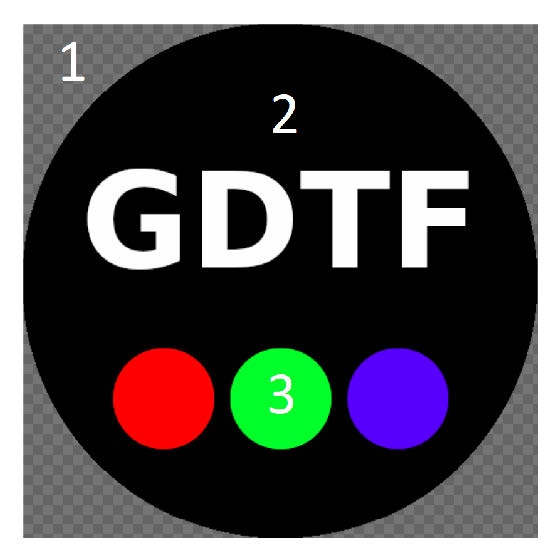
A gobo image is comprised of a transparent Background (1) and the image itself on top. The Background shall be fully transparent and should be considered to be the equivalent of a gobo holder. The Image region shall be fully opaque aside from anti-aliasing, and shall be as large as possible.
Note 1: This allows a data consumer to determine the precise pixel extents of the Image and place the provided PNG over an arbitrary GUI background without additional processing.
The Background region, the equivalent of gobo holder, is defined by full transparency (Alpha 0). In the Image region, Pure Black (RGB 0,0,0) is opaque (2), and Pure White (RGB 255,255,255) is transparent (letter A).
Colored gobos (3) shall use an RGB approximation. The RGB approximation shall be calculated on the basis of Pure White being the CCT of the fixture light source and the ICC color profile embedded within the PNG. (See ISO 15076-1:2010) The default shall be sRGB.
Annex F (normative) SubPhysicalUnit precisions
Pulse
Some attributes are named “[EFFECT]Pulse” (for example Shutter(n)StrobePulse). They should behave like a triangular function. Here is how they are defined:
- The main PhysicalUnit is a frequency which allows to modify the duration of the period T.
- t = 0s corresponds to the activation of the channel function.
- The TimeOffset SubPhysicalUnit is the offset of the end of the pulse from 0, the activation of the channel function, as a percentage of the period T.
- The DutyCycle SubPhysicalUnit corresponds to the fraction of one period in which the value is not 0.
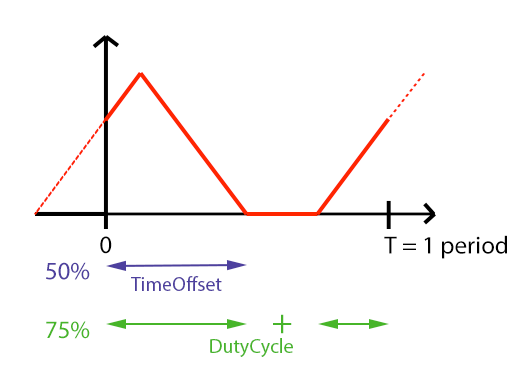
Figure 5. Pulse-like attribute and their SubPhysicalUnits
If there aren’t any value given by the user, the TimeOffset and DutyCycle SubPhysicalUnits are defaulted to 100%:

Figure 6. Default Pulse-like attribute and their SubPhysicalUnits
PulseClose
Some attributes are named “[EFFECT]PulseClose” (for example IrisPulseClose). They should behave like a decreasing ramp. Here is how they are defined:
- The main PhysicalUnit is a frequency which allows to modify the duration of the period T.
- t = 0s corresponds to the activation of the channel function.
- The TimeOffset SubPhysicalUnit is the offset of the end of the pulse from 0, the activation of the channel function, as a percentage of the period T.
- The DutyCycle SubPhysicalUnit corresponds to the fraction of one period in which the value is not 0.
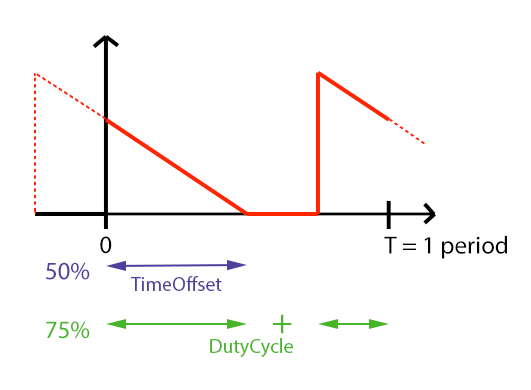
Figure 7. PulseClose-like attribute and their SubPhysicalUnits
If there aren’t any value given by the user, the TimeOffset and DutyCycle SubPhysicalUnits are defaulted to 100%:

Figure 8. Default PulseClose-like attribute and their SubPhysicalUnits
PulseOpen
Some attributes are named “[EFFECT]PulseOpen” (for example Frost(n)PulseOpen). They should behave like an increasing ramp. Here is how they are defined:
- The main PhysicalUnit is a frequency which allows to modify the duration of the period T.
- t = 0s corresponds to the activation of the channel function.
- The TimeOffset SubPhysicalUnit is the offset of the end of the pulse from 0, the activation of the channel function, as a percentage of the period T.
- The DutyCycle SubPhysicalUnit corresponds to the fraction of one period in which the value is not 0.
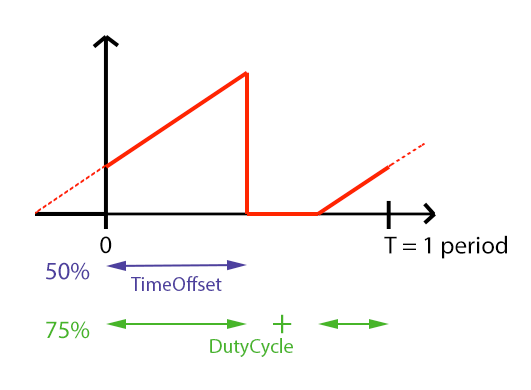
Figure 9. PulseOpen-like attribute and their SubPhysicalUnits
If there aren’t any value given by the user, the TimeOffset and DutyCycle SubPhysicalUnits are defaulted to 100%:

Figure 10. Default PulseOpen-like attribute and their SubPhysicalUnits
Revision History
This section lists all the changes that are made to GDTF.