Manufacturer Onboarding
For device manufacturers who provide or plan to provide GDTF files, we offer extra features in GDTF Share and the GDTF Builder, such as brand category management, a Manufacturer page, and a download-only option in the GDTF Builder (no upload to GDTF Share). There is a dedicated forum section and a monthly manufacturer meeting about MVR & GDTF.
Account registration
If you are a device manufacturer, first register a free account in GDTF Share (https://gdtf-share.com/). Then register in the GDTF Forum (https://gdtf-share.com/forum/) with the same email address. Often companies use info@… or gdtf@… email, to have a company-wide address not linked to a single individual. Make sure to use an email from a domain that clearly asserts a connection with the brand. For detailed instructions on how to register an account in GDTF Share, you can read a dedicated article.
Get in touch
After creating your account, use the Contact us page and tell us the email address you used for GDTF Share and the forum, so we can mark your account as a manufacturer. This enables brand management in GDTF Share and grants access to the manufacturer area in the GDTF Forum for GDTF questions.
Once we have your registration email, we will also add it to the list of manufacturers who receive an invite to the monthly MVR & GDTF meeting, where we discuss progress, proposals, and questions. Past meeting notes and recordings are available in a manufacturer-only section of the forum, link here.
Enable manufacturer page
Once your account is marked as a manufacturer, enable your manufacturer page in GDTF Share to be listed in the Manufacturers section. You can enable this in the Edit Profile page of your account.
- Go to GDTF Share.
- Click the User icon:
 .
. - Click the Manufacturer page.
- Set to Active.
This page is useful for manufacturers providing GDTF files and for software vendors who use MVR & GDTF. You can add posts that describe your product and the support for MVR & GDTF it provides. The page also provides a listing of your GDTF files, which you can share with your customers.
When your Manufacturer page is active and you have at least one blog post or a released GDTF fixture, your logo appears on the GDTF Share Partners page.
See this example page.
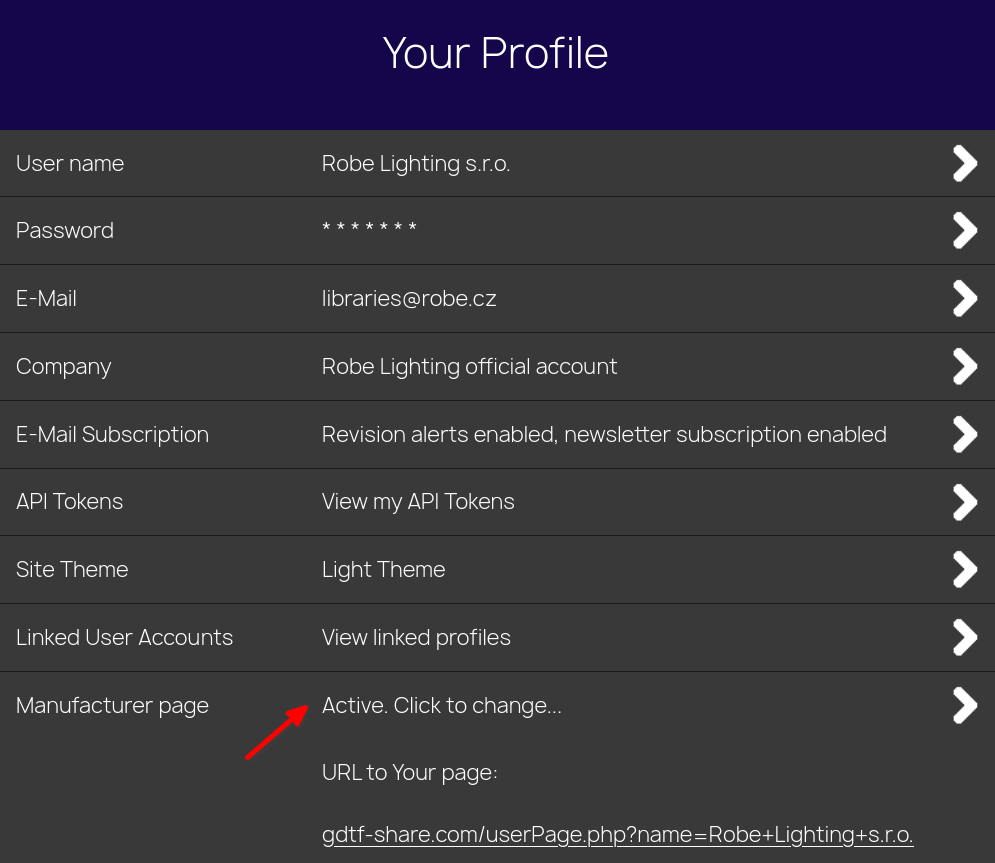
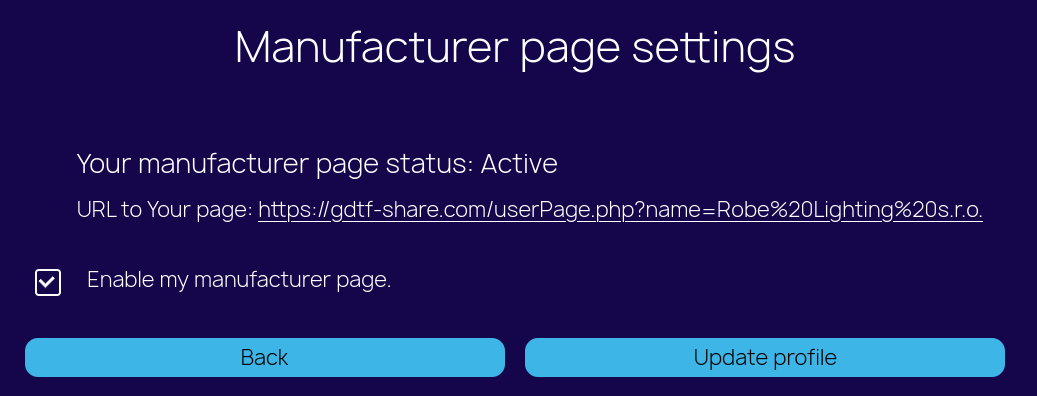
Customize the page with your company logo and header image so we can use this image for the listing on the GDTF Share page. See more details about customization on the Manufacturer page.
- For information about GDTF Share moderation tools for manufacturers see dedicated article about Manufacturer moderation.
- For information about how to further customize your Manufacturer page, see dedicated article about Manufacturer page.
- For information about the GDTF Share, see dedicated article GDTF Share.
- To learn how to use the GDTF Builder, see the GDTF Builder documentation.