Navigate the GDTF Share
The main view of the GDTF Share is divided into several areas:
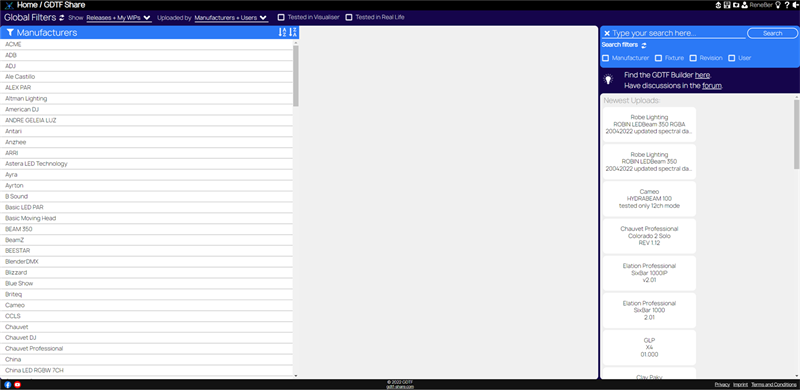
Title Bar
At the top of the page, the Title Bar contains the breadcrumb header. It shows your current location and lets you move back through the current path:
Home / GDTF Share / Manufacturer / Fixture / Revision
The Title Bar also contains the following icons:

Upload:  Read more in the Upload Files topic.
Download multiple files:  Read more in the Download Files topic.
Favorite files:  Read more in the Favorite Files topic.
User:  Read more in the User Creation and Editing topic.
Current username:
The current username is shown next to the user icon in the title bar.
Restart tutorial:  This icon restarts the guided tutorial for the GDTF Share interface.
Help:  This opens this help viewer.
Logout:  Clicking this logs you out of the GDTF Share and you are back on the login page.
Global Filters
Below the title bar are the Global Filters.

These filters affect the lists and search results shown on the page.
- Show: Will only show the following
- Releases + My WIPs - Will show your files which are both released and also WIP - Work In Progress
- Releases - Will show your files which are released
- My WIPs - Will show your files which are Work In Progress
- [MAINTAINER] Releases + All WIPs - Manufacturer only option for files management
- Uploaded by: Will only show the following
- Manufacturers + Users
- Manufacturers only
- Users only
- Tested in Visualiser. Will only show GDTF files that have been tested in a visualiser.
- Tested in Real Life. Will only show GDTF files that have been tested on real fixtures.
Tip
WIP stands for Work In Progress. Files with this Release status are in the GDTF Share but are not available for others to see. Use this feature while you work on a GDTF file, before it is finalized. You can also use this feature to hide older revisions.
The filter section can be expanded or collapsed and can also be reset to the default filter state.
Tip
If you are a manufacturer, please read the documentation for manufacturers, to learn about Manufacturer Moderation
The rest of the page is split into two main working areas:
- The navigation area contains the collapsible menu, the keyword search, the search filters, the links to the GDTF Builder and forum, and a list of newest uploads.
- The fixture area contains the revision table for the selected fixture and the detailed information for the selected revision.
On a fixture page, the detail area also contains:
- The DMX Modes section
- The Revision history
- The Comments section