


sl1200mk2
-
Posts
15 -
Joined
-
Last visited
-
Days Won
2
Content Type
Profiles
Forums
Events
Posts posted by sl1200mk2
-
-
Hi Petr,
in Robin Spiider, Mode 10 - Pattern full RGBW, after offset 55, it's written offset 76, 77, 78, 79.
isn't it 56, 57, 58, 59?
Also in the doc it's written that Mode10 use 123 offsets. Does it mean that from 59 to 123 they're all virtual?
best regards,
nicolas
-
Hi Petr,
thank you for your answer and your plan to update the rest of Special functions.
IMHO it's the responsability of console manufacturer to ensure that value is held "at least" for the duration defined by the manufacturer.
in D::Light case in means that value is held for 4.5s as you defined it to be 4s, I would much prefer that duration in gdtf files reflects what manufacturers says... :)
++
-
 1
1
-
-
Hi Petr,
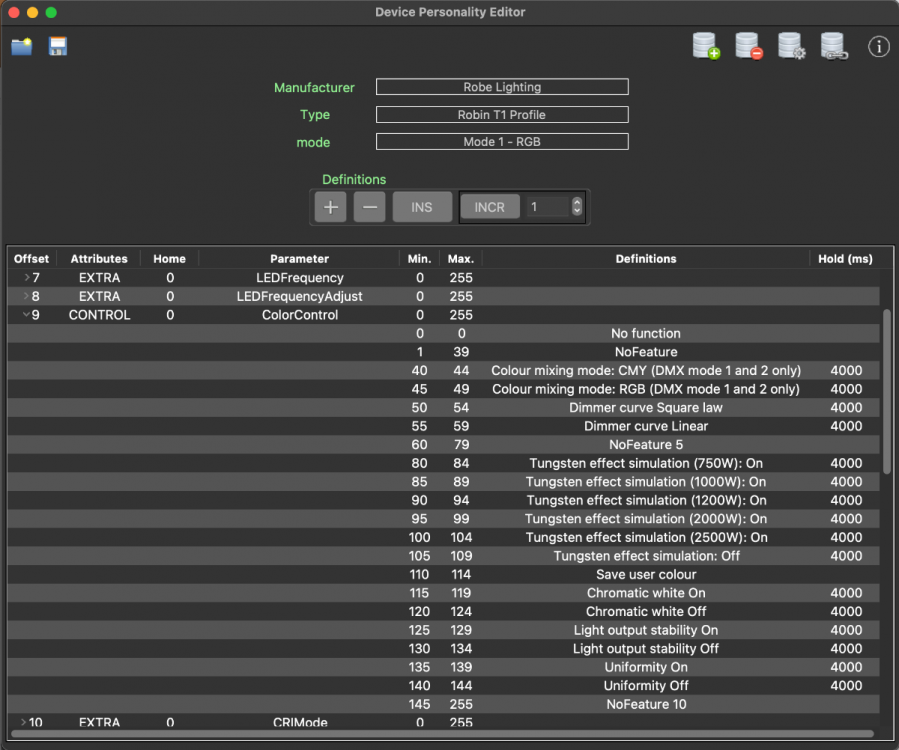
thanks, it works for me (see attached pict).
In the manual it's written: To activate following functions, stop in DMX value for at least 3 seconds.
Why did you set 4s in the macros?
also do you plan to update them for 'Power / Special Functions' offset? (offset 6)
also, could you please fix the "Slow t ofast" typo :)
best regards,
Nicolas
-
thanks for the link.
so not yet, DL does not know about MacroDMX xmlNode. But if you have an example file I can write the parse for it :)
++
-
Hi Petr,
if by Macros you mean an hold time for Control Functions, then yes :)
It would be very nice if you could plug your Robe files with Control Macros.
best regards,
nicolas
-
great !!!
please keep in mind that as D::Light now parse gdtf files, thousands of theater compagny (large or small) have access to it :)
best regards,
Nicolas
-
1
-
-
which is a pitty...
I saw console where you need to hold the button during 5sec before lamp goes off...
I didn't knew I can edit them myself, i'll try.
thanks.
++
-
Hi Petr,
ok... does it mean I have to modify all fixture's personality that require this field? or is it something manufacturer have to do ?
++
-
Hi,
in T1 Profile it's written "Slow t ofast" I guess instead of "Slow to fast"
Attached the description.xml corrected
++
-
Hi,
generally in manufacturer docs it's written that user must hold value during 5s or 3s in order to access function. This is true for resets, lamp On/Off, etc...
I do not found in gdtf files such information.
Am I missing something?
best regards,
nicolas
-
hmm, ok ok...
thank you for your answer.
++
-
Cool,
thank you for the explanation
++
-
Hi,
regarding this .gdtf file Robe_Lighting@Robin_T11_Profile@25112021_without_real_world_spectral_and_intensity_data_2.gdtf in Mode 8-bit CMY/RGB, 9 channels
at offset 8 of this mode there's a ChannelFunction node written like that:
<ChannelFunction Attribute="Shutter1Strobe" DMXFrom="64/1" Default="64/1" Name="Strobe " OriginalAttribute="" PhysicalFrom="0.300000" PhysicalTo="20.000000" RealAcceleration="0.000000" RealFade="0.000000">
<ChannelSet DMXFrom="64/1" Name="Slow to fast 1/12" PhysicalFrom="0.294638" PhysicalTo="0.444664" WheelSlotIndex="0"/>
<ChannelSet DMXFrom="68/1" Name="Slow to fast 2/12" PhysicalFrom="0.495074" PhysicalTo="0.596530" WheelSlotIndex="0"/>
<ChannelSet DMXFrom="71/1" Name="Slow to fast 3/12" PhysicalFrom="0.647566" PhysicalTo="0.750257" WheelSlotIndex="0"/>
<ChannelSet DMXFrom="74/1" Name="Slow to fast 4/12" PhysicalFrom="0.801938" PhysicalTo="1.548464" WheelSlotIndex="0"/>
<ChannelSet DMXFrom="77/1" Name="Slow to fast 5/12" PhysicalFrom="2.109445" PhysicalTo="3.307805" WheelSlotIndex="0"/>
<ChannelSet DMXFrom="80/1" Name="Slow to fast 6/12" PhysicalFrom="3.870541" PhysicalTo="4.661757" WheelSlotIndex="0"/>
<ChannelSet DMXFrom="83/1" Name="Slow to fast 7/12" PhysicalFrom="5.018592" PhysicalTo="5.822651" WheelSlotIndex="0"/>
<ChannelSet DMXFrom="86/1" Name="Slow to fast 8/12" PhysicalFrom="6.307083" PhysicalTo="7.762758" WheelSlotIndex="0"/>
<ChannelSet DMXFrom="89/1" Name="Slow to fast 9/12" PhysicalFrom="8.733976" PhysicalTo="9.703447" WheelSlotIndex="0"/>
<ChannelSet DMXFrom="91/1" Name="Slow to fast 10/12" PhysicalFrom="10.674859" PhysicalTo="12.610068" WheelSlotIndex="0"/>
<ChannelSet DMXFrom="93/1" Name="Slow to fast 11/12" PhysicalFrom="14.558811" PhysicalTo="16.978910" WheelSlotIndex="0"/>
<ChannelSet DMXFrom="95/1" Name="Slow to fast 12/12" PhysicalFrom="19.406895" PhysicalTo="19.406895" WheelSlotIndex="0"/>
</ChannelFunction>
Can you please explain me why it's splitted in part? Or would it be possible to have a new prop to tell that splitting is useful for a specific console ?
in D::Light world, ChannelFunction/ChannelSet are displayed in comboboxes which prevent a manual scrolling in range.
(because are we agree that Shutter is strobing from slow to fast in range from 64 to 95)?
best regards,
nicolas
-
Hi,
now that I wrote a parser of gdtf files for D::Light I have some questions :)
I've tried Robe_Lighting@Robin_T11_Profile@25112021_without_real_world_spectral_and_intensity_data_2.gdtf, in "Mode 1 - 16-bit CMY".
first 18 offsets are feed, but starting at offset19 the offset parameter is blank.
What's the point to keep empty offset? (doc say that T11 in Mode 1 - 16-bit CMY have 18 offsets)
best regards,
Nicolas
typo in Robin Spiider, Mode 10 - Pattern full RGBW
in General
Posted
thank you Petr for the fast answer :)
so I need to refer to <GeometryReference> node in order to calculate offsets, isn't it ?
++